
TL;DR:
- Using an AI-powered job tracker helps manage multiple roles, attach precise application files, and prevent resume drift. It visualizes bottlenecks, automates follow-ups, and surfaces hiring manager contacts to improve response and interview rates. Pluckjobs specifically supports IT professionals with tailored tools for tracking, outreach, and application optimization.
Centralize every application in an AI-powered tracker, attach the exact resume and cover letter used, enable browser capture, and set a 14-day auto-ghost rule. That single workflow prevents resume drift, keeps hiring-manager contacts accessible, and eliminates the spreadsheet burnout that hits when you're managing five or more active roles simultaneously. Start that workflow today at Pluckjobs.
Table of Contents
- What does a job tracker need to do for IT & cybersecurity pros?
- How do you set up an IT/cybersecurity tracking workflow from scratch?
- What follow-up cadence actually works, and how does auto-ghost detection help?
- How do you manage interviews and build prep packets inside the tracker?
- Which metrics should you track to improve your IT job search?
- What does a job tracker typically cost, and when is it worth paying?
- What security checks should you run before storing resumes and contacts in a tracker?
- 10-step quick start checklist to replace your spreadsheet today
- Key Takeaways
- Why Pluckjobs was built specifically for IT pros
- Pluckjobs gives IT and cybersecurity pros a ready-made tracking system
- Useful sources and further reading
- FAQ
What does a job tracker need to do for IT & cybersecurity pros?
Tracking IT job applications goes beyond a status column in a spreadsheet. The features below are the ones that materially change outcomes for technical candidates.
| Feature | Why it matters for IT/cybersecurity |
|---|---|
| Kanban pipeline (Applied → In Review → Interview → Offer → Rejected) | Visualizes bottlenecks at a glance across multiple concurrent roles |
| Browser extension / URL capture | Auto-extracts JD, company, salary, and tech stack; eliminates manual copy-paste |
| Resume and cover letter version control | Links the exact file used to each application; prevents rehearsing the wrong resume before an interview |
| Hiring-manager and recruiter contact storage | Keeps outreach data, referral notes, and source context alongside each role |
| Auto-ghost detection | Flags non-responders automatically so follow-up time goes where it can convert |
| AI resume scoring and ATS keyword alignment | Scores your resume against the saved JD and highlights missing keywords without inventing experience |
| Interview scheduling reminders and calendar sync | Surfaces upcoming interviews and prevents time-zone errors |
AI tailoring tools that score resumes against a specific JD are especially valuable in cybersecurity, where a single missing keyword (SIEM, SOAR, Zero Trust) can drop an otherwise strong resume below an ATS threshold.
How do you set up an IT/cybersecurity tracking workflow from scratch?
A reproducible setup takes under an hour. Work through these steps in one session.
- Create your account (5 min): Sign up and complete your profile with your base resume, preferred role types, and target locations.
- Install the browser extension (5 min): One-click capture from any job board saves the JD, company, salary, and tech stack directly into your dashboard without leaving the page.
- Import existing applications (10 min): Paste a spreadsheet export or add roles manually. Map columns to structured fields: job link, company, role title, tech stack, required skills, salary, resume version, cover letter version, referral contact, recruiter contact, notes, next action, and date applied.
- Define your tag taxonomy (5 min): Use four tag dimensions: Platform (Cloud, On-Prem, Hybrid), Role (SecOps, AppSec, NetEng, DevOps), Level (Junior, Mid, Senior, Staff), and Remote (Full, Partial, On-site).
- Configure pipeline stages and ghost rule (5 min): Set the auto-ghost flag on every new application to surface roles with no recent response automatically in a "Follow Up" filter.
- Enable calendar sync (5 min): Connect Google Calendar or Outlook. Set interview reminders 24 hours and 1 hour before; include time-zone confirmation in the reminder note.
- Upload resume variants (10 min): Store at least two versions: a general IT resume and a cybersecurity-specific variant. Label them clearly so the tracker links the right file to each submission.
- Run one test application (15 min): Use the browser extension on a live posting. Confirm the JD, salary, and tech stack populate correctly, then attach the correct resume variant before saving.
Pro Tip: Attach the resume file at the moment you apply, not afterward. Waiting even a day introduces the risk of attaching an updated version that the recruiter never saw, which creates confusion during interviews.
What follow-up cadence actually works, and how does auto-ghost detection help?

| Stage | Timing | Action |
|---|---|---|
| Application submitted | — | Log entry; attach resume and cover letter |
| Light follow-up | Day 7 | Short email to recruiter or hiring manager if contact found |
| Heavier follow-up | Day 14 | Second outreach; auto-ghost flag triggers if no response |
| Re-check | Day 60 | Review role status; mark as stale if still silent |
| Archive | Day 60+ | Move to archived; note reason (ghosted, filled, withdrawn) |
Auto-ghost detection surfaces flagged records in a dedicated pipeline view and generates a reminder to follow up. Prioritize follow-ups by signal strength: a referral present outweighs a cold application; a high AI fit score outweighs a low one; an active recruiter response resets the clock entirely.
Short follow-up template for a hiring manager:
Stop following up after a couple of unanswered attempts. Archive the role with a "ghosted" tag and move on. Spending a third outreach on a silent role costs time better spent on active pipeline entries.
How do you manage interviews and build prep packets inside the tracker?
Every job card should hold a complete interview packet before the first call. Save the following per interview:
- Date, time, and time zone of each interview round
- Interviewer names, titles, and LinkedIn profiles
- Exact resume version submitted (link to the file in the tracker)
- Direct link to the job description
- Code challenge link or take-home assignment URL
- Expected tech stack and any setup instructions sent by the recruiter
- Referral context: who referred you, what they said about the team or role
Before each interview, run a short pre-interview checklist: read the saved JD, rehearse three role-specific behavioral stories, review the code-challenge repository, and confirm logistics (dial-in link, time zone). Storing source context means you can pull up exactly what the recruiter saw in under 30 seconds, which matters when a hiring manager calls unexpectedly after 40 days.
Which metrics should you track to improve your IT job search?
| KPI | Formula | What a low number tells you |
|---|---|---|
| Response rate | Responses / Applications sent | Resume or targeting needs work |
| Interview rate | Interviews / Responses | Cover letter or phone screen needs work |
| Offer rate | Offers / Interviews | Interview performance or fit needs work |
| Ghost rate | Applications with no response after 14 days / Total applications | Follow-up cadence or application volume is off |
| Time-to-offer | Days from first application to offer | Pipeline velocity; flag if consistently over 60 days |
| Active pipeline size | Open roles not yet archived | Keep a manageable number for follow-up load |
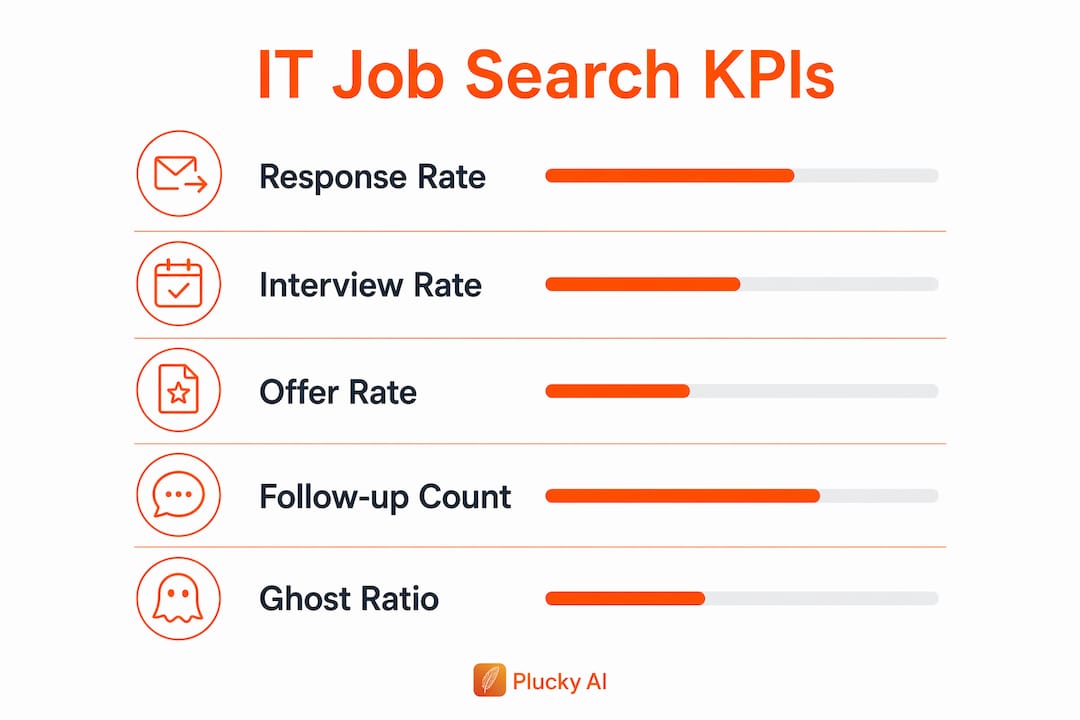
Track these job search metrics weekly. A low response rate points to resume tailoring gaps; a low interview rate usually means the cover letter or recruiter screen needs attention. Review cohort outcomes by role type monthly to spot which tags (SecOps vs. DevOps, Senior vs. Staff) convert best.
What does a job tracker typically cost, and when is it worth paying?
Most trackers offer a free tier capped at around 10 active applications before requiring a paid plan. That limit is fine for a passive search but breaks quickly when you're applying to five or more roles per week.
Paid plans typically unlock:
- Unlimited active applications and pipeline history
- Advanced AI resume tailoring and ATS keyword scoring
- Priority resume rewrite credits
- Hiring-manager contact exports and outreach credits
The ROI case is straightforward. AI-driven job search tools save meaningful time on manual capture and resume customization. Pay for a plan when you're consistently applying to five or more roles per week and automation saves you two or more hours weekly. At that volume, the time recovered easily justifies a monthly subscription.
What security checks should you run before storing resumes and contacts in a tracker?
Resumes contain PII. Hiring-manager contact data is sensitive. Run these checks before committing to any platform:
- Confirm encryption at rest and in transit (look for AES-256 and TLS 1.2+)
- Verify data export controls and per-record deletion support
- Read the privacy policy for contact-data reuse clauses; confirm the vendor does not sell contact lists
- Review third-party integration permissions (calendar, email) and limit scope to read-only where possible
- Check whether shared or team access can expose your data to other users
Pro Tip: Enable two-factor authentication on your tracker account immediately after signup. Rotate outreach templates every few months to avoid pattern-matching by spam filters, and avoid storing unredacted PII (full SSNs, passport numbers) in free-text notes fields.
10-step quick start checklist to replace your spreadsheet today
| Step | Action | Time |
|---|---|---|
| 1 | Create your tracker account and complete your profile | 5 min |
| 2 | Install the browser extension | 5 min |
| 3 | Import your existing spreadsheet or add roles manually | 10 min |
| 4 | Define your tag taxonomy (Platform, Role, Level, Remote) | 5 min |
| 5 | Upload at least two resume variants and label them clearly | 10 min |
| 6 | Enable auto-ghost detection with a 14-day rule | 3 min |
| 7 | Connect your calendar and set interview reminders | 5 min |
| 8 | Set your KPI targets (response rate, ghost rate, active pipeline size) | 5 min |
| — | Create two follow-up templates (recruiter and hiring manager) | 7 min |
| 10 | Run one test application using the browser extension end-to-end | 15 min |
Total: 70 minutes. Block a single session and you're off spreadsheets permanently. The full IT application workflow guide covers edge cases if you hit friction during import.
Key Takeaways
An AI-powered tracker that centralizes applications, attaches exact resume versions, auto-detects ghosts, and surfaces hiring-manager contacts is the single most effective system for IT and cybersecurity job seekers managing five or more active roles.
| Point | Details |
|---|---|
| Centralize from day one | Store job link, resume version, cover letter, and recruiter contact on every card. |
| Attach the exact resume used | Linking the submitted file prevents rehearsing the wrong version before interviews. |
| Enable auto-ghost detection | Set a 14-day rule so the tracker surfaces non-responders without manual review. |
| Measure your conversion funnel | Track response rate, interview rate, offer rate, and ghost rate weekly to find bottlenecks. |
| Pluckjobs for IT/cybersecurity | Pluckjobs combines Apollo contact intelligence and SerpAPI discovery with built-in tracking, resume tailoring, and auto-ghost detection in one platform. |
Why Pluckjobs was built specifically for IT pros
The problem that drove Pluckjobs wasn't a lack of job boards. IT and cybersecurity professionals already had plenty of listings. The gap was everything around the application: knowing which resume version went to which company, having the hiring manager's contact ready before the 14-day window closed, and avoiding the context collapse that happens when you're managing 20 roles across three spreadsheets. Pluckjobs was built to close that gap by pairing SerpAPI-powered role discovery with Apollo contact intelligence, so the platform surfaces the role and the person to contact in the same workflow. The feature I watch most closely is hiring-manager response velocity. When candidates have direct contact data and a structured follow-up cadence, response rates improve measurably compared to cold applications with no outreach path. For deeper reading on structuring your search data, the IT job search data guide and the AI tools for IT job search post cover the underlying methodology.
Pluckjobs gives IT and cybersecurity pros a ready-made tracking system
Cold applications with no hiring-manager contact and no follow-up system produce low response rates. Pluckjobs is built for IT and cybersecurity professionals who want the opposite: precision role discovery via SerpAPI, direct hiring-manager contact data from Apollo, AI resume optimization against the saved JD, browser capture, auto-ghost detection, and credit-based interview coaching, all in one dashboard.
The free trial gives you immediate access to role discovery and resume tailoring. When you're ready to add hiring-manager outreach credits and advanced AI coaching, paid plans scale with your search volume. Start your free trial at Pluckjobs and run your first tracked application today.
- AI resume optimization with ATS keyword alignment for IT and cybersecurity roles
- Hiring-manager contact data and structured outreach support via Apollo intelligence
- Auto-ghost detection, pipeline tracking, and interview prep in one platform
Useful sources and further reading
- IT Job Application Checklist: Your 2026 Guide — step-by-step checklist with time estimates for setting up your tracking workflow
- Job Search Metrics to Track for IT Professionals — detailed KPI definitions and reporting examples
- AI Job Matching for IT and Cybersecurity Pros: 2026 Guide — how AI-driven role discovery works for technical candidates
- Automation tools for businesses: 2026 decision guide — broader automation context for readers architecting tracker integrations with calendars and business tools
- Pluckjobs main site — product overview, pricing, and feature details
FAQ
What is the best way to track IT job applications?
Centralize every application in an AI-powered tracker with Kanban pipeline stages, browser capture, and a 14-day auto-ghost rule. Attach the exact resume and cover letter used to each job card so you always know what the recruiter reviewed.
How many applications should be in an active pipeline?
Keep 10–20 active roles in your pipeline for a manageable follow-up load. Above that threshold, automation (auto-ghost detection and follow-up templates) becomes necessary to avoid missing response windows.
When should you stop following up on a job application?
Stop after two unanswered outreach attempts. Archive the role with a "ghosted" tag at the 60-day mark and redirect that time to active pipeline entries with stronger signals.
Does Pluckjobs support hiring-manager contact outreach?
Yes. Pluckjobs combines Apollo contact intelligence with SerpAPI role discovery to surface hiring-manager contact data alongside each matched role, so outreach is built into the same workflow as tracking.
What KPIs matter most for an IT job search?
Response rate, ghost rate (the percentage of applications with no response after 14 days), and time-to-offer are the three most diagnostic metrics. A low response rate points to resume tailoring gaps; a high ghost rate signals follow-up cadence or targeting issues; a long time-to-offer flags pipeline velocity problems.