
TL;DR:
- The IT job application process involves multiple stages that control candidate progress and success. Managing timing, keywords, and application pipelines greatly improves the chances of advancing. Candidates who treat applications as structured data and follow up diligently tend to outperform those who do not.
The IT job application workflow is a structured, multi-stage process that moves candidates from job discovery through onboarding, and mastering it is the single biggest factor separating hired candidates from ignored ones. Most IT professionals treat job searching as a series of one-off submissions. The ones who get hired treat it as a managed pipeline. Tools like Oracle HRMS and Paylocity ATS sit at the center of every modern IT hiring workflow, controlling which candidates advance and which disappear. Understanding how these systems work gives you a measurable edge before a single human recruiter reads your name.
What are the fundamental stages in the IT job application workflow?
The IT recruitment process follows eight defined stages, each with specific candidate requirements and expectations. Skipping or mishandling any one stage reduces your chances of advancing to the next. The stages are not arbitrary. They exist because technical hiring requires both skills validation and cultural alignment, and those two things cannot be assessed in a single conversation.
The eight stages run in this order:
- Role definition — The hiring team writes the job description, defines required skills, and sets compensation bands. You benefit from this stage by reading job descriptions carefully for exact skill keywords.
- Sourcing — Recruiters post roles on LinkedIn, Indeed, and niche IT job boards. Apply as soon as a role appears.
- Resume and portfolio screening — An ATS parses your resume before any human sees it. Keyword alignment and clean formatting determine whether you pass.
- Technical assessment — Coding challenges, system design exercises, or cybersecurity scenario tests. Platforms like HackerRank and Codility are common here.
- Culture fit interview — A conversation focused on communication style, team dynamics, and values alignment. This is separate from technical ability by design.
- Offer negotiation — Compensation, start date, and benefits are discussed. Candidates who reach this stage often lose offers by delaying responses.
- Background and reference checks — Standard for most IT roles, especially those involving access to sensitive systems.
- Onboarding — The final stage, where the candidate transitions from applicant to employee.
Separating technical assessments from culture fit interviews is not a formality. It prevents bias from technical performance bleeding into cultural evaluation, and it gives you a clear signal about where you stand at each checkpoint.
Pro Tip: Prepare a one-page technical summary of your three most relevant projects before stage four. Interviewers using platforms like HackerRank often ask candidates to walk through past work before the live challenge begins.

How do applicant tracking systems shape the IT hiring workflow?
An applicant tracking system is software that centralizes every step of hiring, from job posting and application collection to resume screening, interview scheduling, and candidate status updates. Paylocity ATS, iCIMS, and Oracle HRMS are among the most widely deployed in enterprise IT environments. Every application you submit enters one of these systems first.
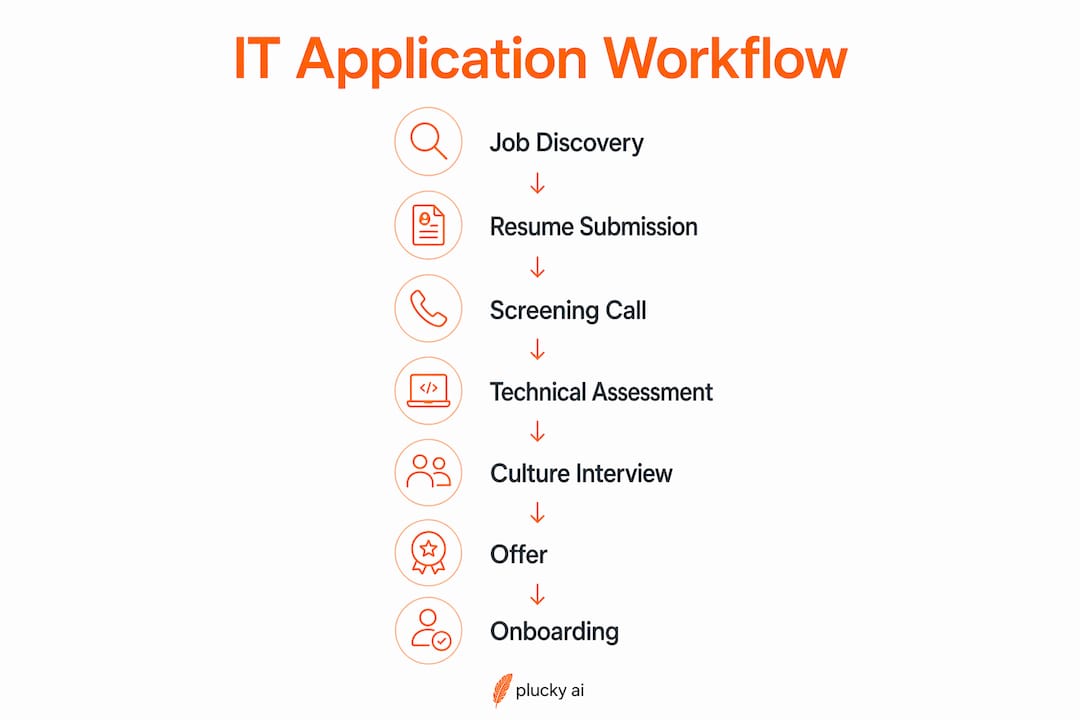
ATS platforms control candidate movement through defined phases and statuses. Oracle HRMS tracks applicants through configurable phases including Applied, Reviewed, Screen, Interview, Offer, Hire, and Reject. Recruiters cannot manually skip a candidate past a mandatory phase. That means your application must satisfy the criteria at each gate before a human decision is even possible.
What this means for you as a candidate:
- Treat your application as structured data entry. ATS systems parse your resume into discrete fields: job titles, dates, skills, education. Ambiguous formatting breaks this parsing.
- Match keywords exactly. If the job description says "network security," your resume should say "network security," not "network protection" or "cybersecurity defense."
- Fill every form field completely. Structured form inputs often carry more weight in ATS scoring than the resume file itself. A blank field is a disqualifying signal.
- Use standard section headers. Labels like "Work Experience," "Skills," and "Education" are what ATS parsers expect. Creative headers like "Where I've Been" cause parsing failures.
- Monitor your application status. Most ATS portals show a phase progression bar. If your status has not moved in ten business days, a follow-up email to the recruiter is appropriate.
Status gating in Oracle recruiting restricts which candidates recruiters can process at any given phase. This is not a human decision. It is a system rule. Candidates who do not meet phase criteria are filtered out automatically, often without any notification.
Pro Tip: Run your resume through a free ATS checker like Jobscan before submitting to any role. It compares your resume text against the job description and flags missing keywords before the system does.
What timing strategies improve your results in the IT job application process?
Applying within 24 hours of a job posting going live increases your ATS ranking and puts your application in front of recruiters before the volume of submissions triggers automated filtering. Early applications are not just seen first. They are scored higher by systems that weight submission recency.
The average time-to-fill for technical roles in the US is approximately 44 days. That timeline includes roughly 8–9 days each for screening and interviewing, plus additional time for offer processing and background checks. Knowing this prevents you from misreading silence as rejection.
Key timing practices that protect your candidacy:
- Apply within 24 hours. Set job alerts on LinkedIn and Indeed for your target roles so you are notified the moment a position is posted.
- Respond to recruiter outreach within four hours. Delayed responses signal low interest and give other candidates the scheduling advantage.
- Schedule interviews for the earliest available slot. Candidates who take the first available time slot are perceived as more motivated and are less likely to be displaced by a faster-moving applicant.
- Set a personal follow-up reminder for every application. If you have not heard back within ten business days of submitting, send a brief, professional follow-up email.
- Track every application with a stage label. Labels like Applied, Phone Screen Scheduled, Technical Assessment Sent, and Offer Pending give you a clear picture of where each opportunity stands.
The 44-day average also means you should be running multiple applications concurrently. A single-application approach creates a bottleneck that can cost you weeks of momentum if one opportunity stalls.
What tools help IT professionals manage their job search pipeline?
A personal job application pipeline with explicit stage labels and follow-up dates is the most effective tool for managing concurrent IT applications. Without it, applications get lost, follow-ups get missed, and opportunities expire silently. The pipeline does not need to be complex. It needs to be consistent.
| Tool | Primary Function | Best For |
|---|---|---|
| Notion + GPT integration | Application tracking with AI-generated interview prep notes | Candidates managing 10+ active applications |
| Job search CRM | Contact tracking, follow-up scheduling, recruiter outreach | IT professionals doing direct outreach |
| Jobscan | ATS keyword matching and resume scoring | Resume optimization before submission |
| LinkedIn Job Alerts | Real-time job posting notifications | Early application timing |
| Google Sheets | Simple pipeline tracking with custom stage labels | Candidates who prefer manual control |
Resume formatting for ATS compatibility follows a short set of rules. Use a single-column layout. Avoid tables, graphics, and text boxes inside the resume file. Use standard fonts like Calibri or Arial. List dates in a consistent format such as "jan 2023 – dec 2024." Ambiguous date formatting and inconsistent skill listings reduce ATS match scores and recruiter interest significantly.
A job search CRM goes beyond a spreadsheet by storing recruiter contact details, email history, and follow-up schedules in one place. For IT professionals targeting specific companies, a CRM is the difference between a managed outreach campaign and a scattered collection of sent emails.
Pro Tip: Build your Notion pipeline with five columns: Applied, Screening, Technical Assessment, Interview, and Offer. Add a "Last Action Date" field to every row. Any row where the last action date is older than ten days needs a follow-up.
What are common pitfalls in the IT job application workflow?
The most damaging mistakes in the IT hiring workflow are invisible to candidates because they happen inside ATS systems before a recruiter ever opens an application. Fixing them requires understanding what the system is looking for, not just what looks good on paper.
Common pitfalls and how to fix them:
- Submitting a resume with graphics or columns. ATS parsers read left to right in a single pass. Multi-column layouts cause skills and job titles to merge into unreadable strings.
- Using job titles that differ from the posting. If the role is titled "Cloud Security Engineer" and your resume says "Cloud Infrastructure Specialist," the keyword match score drops.
- Leaving optional form fields blank. ATS systems score completeness. A blank "years of experience" field is treated as zero years in some systems.
- Applying late in the posting cycle. Roles posted more than two weeks ago often have a full candidate slate already in the screening phase. Your application enters a crowded queue.
- Failing to track application status. Candidates who do not monitor their ATS portal miss status changes that require action, such as a request to complete an additional assessment.
Candidates who treat applications as data submissions rather than document sends consistently advance further in ATS-managed hiring processes.
Missing a technical assessment deadline is one of the most common reasons IT candidates are rejected after passing the initial screen. Assessments sent through platforms like HackerRank or Codility typically have a 48–72 hour completion window. Check your spam folder after every application submission. Assessment invitations frequently land there.
Tracking common IT job search mistakes as a checklist before each submission reduces the chance of avoidable disqualification. The goal is to make your application as easy as possible for both the ATS and the recruiter to process.
Key Takeaways
The IT job application workflow is a structured, ATS-governed process where timing, keyword alignment, and pipeline management determine whether candidates advance or disappear.
| Point | Details |
|---|---|
| Apply within 24 hours | Early submissions rank higher in ATS systems and reach recruiters before volume filtering kicks in. |
| Format resumes for ATS parsing | Use single-column layouts, standard headers, and consistent date formats to avoid parsing failures. |
| Track every application as a pipeline | Assign stage labels and follow-up dates to every active application to prevent missed opportunities. |
| Understand ATS phase gating | Candidates cannot skip mandatory ATS phases, so meeting each stage's criteria is non-negotiable. |
| Respond to recruiters fast | Delayed responses to interview requests give faster-moving candidates the scheduling advantage. |
Why most IT candidates lose before a human sees their resume
I have reviewed hundreds of IT job applications over the years, and the pattern is consistent. Candidates with strong technical skills get filtered out at the ATS stage because they submitted a resume built for human eyes, not machine parsing. A beautifully designed PDF with a sidebar skills column and a custom font reads as noise to an ATS. The candidate never knows why they did not hear back.
The second pattern I see constantly is poor pipeline management. IT professionals apply to a role, wait two weeks with no follow-up, then assume the opportunity is dead. In reality, the role may still be in the screening phase, and a single follow-up email would have moved them forward. The 44-day average fill time means silence is almost never a final answer. It usually means the process is still running.
The candidates who get hired treat the job search as a managed pipeline with metrics. They know how many applications are active, what stage each one is in, and when the next follow-up is due. That level of organization is not obsessive. It is the minimum required to compete in a market where the average tech role receives hundreds of applications within the first 48 hours.
My honest recommendation: build your pipeline before you apply to a single role. Set up your tracking system, write your ATS-optimized resume, and configure job alerts. The candidates who do this work upfront spend less time waiting and more time interviewing.
— Diego
How Pluckjobs handles your IT job application pipeline
IT professionals who apply without a system waste weeks on roles that were never a real fit.
Pluckjobs is built specifically for IT and cybersecurity professionals who want to apply with precision. The platform combines Apollo contact intelligence with SerpAPI-powered role discovery to surface roles that match your actual skill set, not just your job title. You get hiring manager outreach data alongside each match, so you can contact the right person directly instead of submitting into an ATS black hole. Tailored resumes are generated for each role, pre-optimized for ATS keyword alignment. Start your search with Pluckjobs and replace scattered applications with a focused, data-driven approach.
FAQ
What is the IT job application workflow?
The IT job application workflow is an eight-stage process covering role definition, sourcing, resume screening, technical assessment, culture fit interviews, offer negotiation, background checks, and onboarding. Each stage has defined candidate requirements and is typically managed through an ATS platform.
How does an ATS affect my IT job application?
An ATS parses your resume into structured data fields and scores it against the job description before any recruiter reviews it. Keyword alignment, clean formatting, and complete form fields determine whether your application advances to the next phase.
How long does the IT hiring process typically take?
The average time-to-fill for technical roles in the US is approximately 44 days. This includes 8–9 days each for screening and interviewing, plus time for offer processing and background checks.
When should I follow up after submitting an IT job application?
Send a brief follow-up email to the recruiter if you have not received a status update within ten business days of submitting. Most ATS portals also show a phase progression bar you can monitor directly.
What tools help manage multiple IT job applications at once?
A Notion pipeline with stage labels, a job search CRM for recruiter contact tracking, and Jobscan for ATS keyword scoring are the three most effective tools for managing concurrent IT applications efficiently.