
TL;DR:
- AI interview prep tools analyze audio, transcribe questions, retrieve context, and generate structured responses in seconds. They incorporate features like mock simulations, real-time suggestions, and feedback to improve candidates' interview performance. Effective use involves personalized uploads, focused practice, post-session review, and blending AI use with human feedback.
Interview prep tools are digital systems that use real-time audio capture, AI transcription, context retrieval, and large language models to generate personalized answer suggestions during practice or live interviews. Platforms like OphyAI Interview Copilot, Big Interview, and LinkedIn Interview Prep represent the current generation of these tools, each applying AI models such as GPT-4o and Whisper to deliver fast, structured coaching. For IT job seekers, understanding how interview prep tools work is the difference between using these platforms at surface level and extracting their full value.
How does the technical pipeline of AI interview prep tools operate?
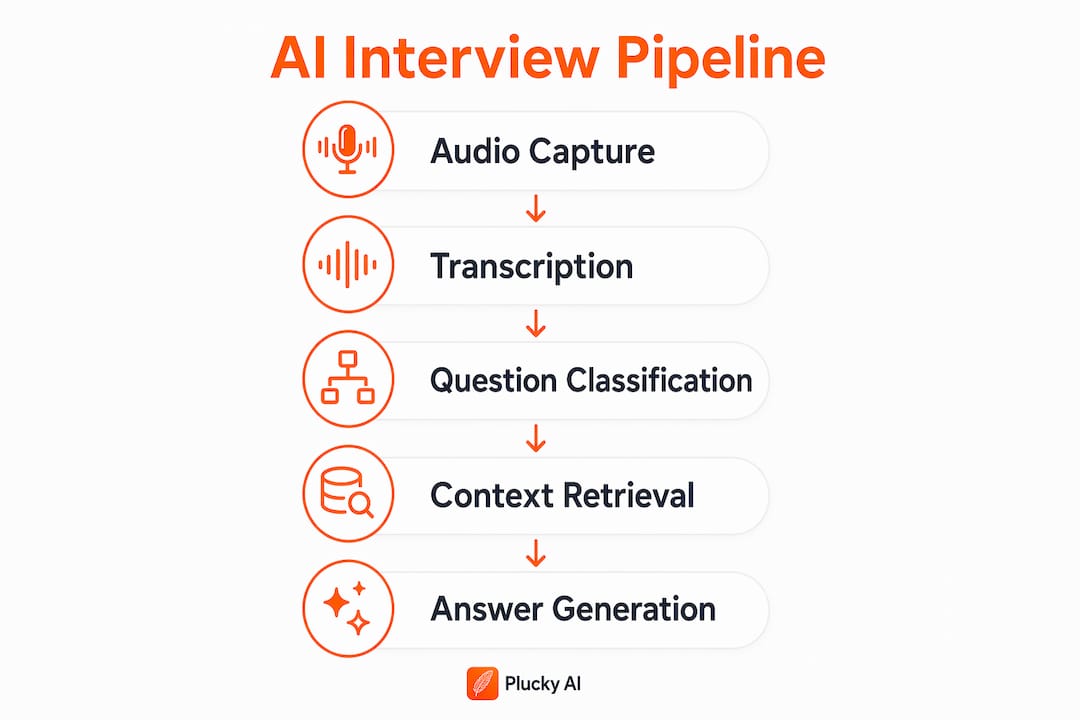
Interview prep tools use a multi-stage pipeline that includes audio capture, transcription, question classification, context retrieval, and answer generation. Each stage feeds the next, and the entire sequence must complete before you start speaking. That timing constraint shapes every design decision in these systems.

Audio capture is the entry point. The tool records both system audio (the interviewer's voice through your speakers) and microphone input (your own voice). Capturing both channels lets the system distinguish who is speaking and when.
The captured audio then passes through automatic speech recognition (ASR). Most modern tools use Whisper or a similar architecture to convert speech to text with low latency. Real-time AI assistants generate answer suggestions in 1.5 to 2.5 seconds after a question ends. That window is tight, which is why ASR accuracy matters so much.
After transcription, the system applies voice activity detection and speaker diarization. These techniques segment the audio stream and label each segment by speaker. Open-source meeting assistants use tools like WebRTC VAD and pyannote.audio to achieve roughly 95% diarization accuracy at low latency. Without accurate speaker separation, the question classifier cannot tell interviewer prompts from candidate responses.
The classified question then triggers context retrieval. The tool searches your uploaded resume and job description using semantic embeddings, pulling the most relevant chunks. A behavioral question about leadership retrieves your management experience. A technical question about cloud infrastructure retrieves your AWS or Azure credentials. This is what makes suggestions feel personalized rather than generic.
Finally, a large language model such as GPT-4o or a Claude variant generates a structured answer outline. For behavioral questions, the output follows the STAR method. For technical questions, it includes a recommended approach, step-by-step logic, and sometimes a code snippet.
Pro Tip: Upload a job description that matches the specific role you are interviewing for, not a generic version. The context retrieval step pulls directly from that file, so specificity in your upload equals specificity in your suggestions.
What features differentiate popular interview prep tools?
The core pipeline is similar across platforms. What separates them is the feature layer built on top of that pipeline.
| Feature | What it does | Why it matters for IT job seekers |
|---|---|---|
| Mock interview simulation | Delivers timed questions with follow-up prompts | Replicates real interview pacing and pressure |
| Real-time answer suggestions | Generates bullet-point talking points mid-interview | Reduces blank-mind moments on technical questions |
| Delivery feedback | Flags pacing issues and filler words | Helps candidates sound confident, not rehearsed |
| Resume-grounded suggestions | Pulls context from your uploaded resume | Keeps answers specific to your actual experience |
| Post-session replay | Records video or transcript for review | Lets you catch habits you miss in the moment |
| Technical answer formatting | Includes code snippets and complexity notes | Directly addresses the format IT interviewers expect |
Big Interview focuses on structured mock sessions with video recording and playback. LinkedIn Interview Prep offers question banks organized by role and industry. OphyAI Interview Copilot targets live interview assistance with real-time overlay suggestions. Each tool reflects a different philosophy about where in the preparation cycle candidates need the most support.
Automated feedback on pacing, filler words, and structure paired with video review helps candidates self-correct faster than waiting for a human coach. That speed of feedback loop is the primary advantage AI tools hold over traditional preparation methods.
For IT job seekers specifically, technical answer formatting is a standout differentiator. Tools that include a short recommended approach, a logic walkthrough, and a sample code snippet give candidates a structured scaffold rather than a blank page when facing algorithm or system design questions.
Pro Tip: Use the post-session transcript, not just your memory, to evaluate your answers. Transcripts reveal filler words and incomplete STAR structures that feel fine in the moment but read poorly on review.
How do interview prep tools apply effective interview strategies?
The best tools do not just record and replay. They embed proven interview preparation techniques directly into the practice flow.
-
STAR method structuring. The STAR framework divides behavioral answers into Situation, Task, Action, and Result. STAR method allocates roughly 50–60% of answer time to the Action phase, which is where most candidates underdeliver. AI tools that auto-generate STAR outlines force you to spend time on the Action section rather than over-explaining context.
-
Timed practice loops. Mock interview simulators recreate realistic interview flows with timed questions and recorded responses. Timed loops train you to complete a full answer within a natural window, which reduces rambling and signals confidence to interviewers.
-
Single-focus feedback. Effective interview feedback focuses on one fix at a time to avoid overwhelming candidates. The design principle is to translate each feedback session into a single next drill. Trying to fix pacing, structure, and content simultaneously produces worse outcomes than fixing one at a time.
-
Full-answer completion before correction. Completing full answer rounds before adjusting yields the most significant skill improvement over time. Stopping mid-answer to correct yourself trains hesitation, not fluency. AI tools that enforce full-answer completion before showing feedback reinforce this principle automatically.
-
Technical question walkthroughs. For IT roles, tools that break technical answers into approach, logic, code, and complexity analysis mirror the format interviewers actually evaluate. Practicing in that format builds the habit of structured technical communication.
-
Simulated interviewer interaction. Some platforms generate follow-up questions based on your previous answer. This trains you to handle the dynamic, unpredictable nature of real interviews rather than just reciting prepared responses.
What practical tips maximize the value of interview prep tools?
Knowing how a tool works is only useful if you use it correctly. These practices separate candidates who improve from those who just go through the motions.
- Upload a tailored resume and job description before every session. Generic uploads produce generic suggestions. The context retrieval step is only as good as the documents you feed it.
- Treat AI suggestions as talking points, not scripts. Reading suggestions verbatim sounds robotic. Use the bullet points as a structure, then deliver the answer in your own words.
- Focus each session on one weak area. Breaking feedback into single next drills improves practice outcomes more than trying to fix everything at once. Pick pacing, or STAR structure, or technical depth. Not all three.
- Review post-session transcripts with a specific question in mind. Ask yourself: Did I spend enough time on the Action phase? Did I use filler words? Did I complete the Result? Targeted review beats passive replay.
- Combine AI practice with at least one human mock interview per week. AI tools catch measurable patterns. Human partners catch tone, energy, and cultural fit signals that models still miss.
- Account for latency when using live overlays. Latency management is critical in real-time AI assistants. If your internet connection is slow, suggestions may arrive too late to be useful. Test your setup before a real interview.
- Track your interview performance metrics across sessions. Improvement is easier to see when you measure it. Note your filler word count, answer completion rate, and STAR adherence across multiple sessions.
Key takeaways
Interview prep tools work by combining real-time audio capture, AI transcription, semantic context retrieval, and large language model generation to deliver structured, personalized answer suggestions before you finish processing the question.
| Point | Details |
|---|---|
| Multi-stage pipeline | Tools capture audio, transcribe it, classify the question, retrieve resume context, and generate answers in under 2.5 seconds. |
| STAR method is built in | Most AI tools auto-structure behavioral answers using the STAR framework, with emphasis on the Action phase. |
| Single-focus feedback wins | Fixing one weakness per session produces better outcomes than addressing multiple issues simultaneously. |
| Technical formatting matters | IT-specific tools include code snippets and complexity analysis, matching the format technical interviewers expect. |
| Human practice remains necessary | AI tools catch measurable patterns, but human mock interviews reveal tone and cultural fit signals that models miss. |
What I have learned after watching IT candidates use these tools
The most common mistake I see is treating AI interview tools as a crutch rather than a training device. Candidates open the overlay, read the suggestions word for word, and then wonder why they sound flat in the actual interview. The tool is not there to speak for you. It is there to give you a structure you can internalize through repetition.
The second mistake is skipping the post-session review. Private, repeatable practice combined with real-time feedback is where the real value lives, but only if you close the loop. Watching your own transcript is uncomfortable. Do it anyway. The filler words and incomplete answers you see on screen are the same ones the interviewer heard.
The candidates who improve fastest are the ones who treat each session as a focused drill, not a full rehearsal. They pick one thing to fix, run five timed answers targeting that one thing, and then stop. That approach, combined with a long-game job search strategy, compounds faster than any single tool or technique alone.
AI interview tools are genuinely useful for IT job seekers. They compress the feedback cycle, remove the scheduling friction of human coaches, and give you a structured scaffold for technical answers. But they work best when you understand what they are doing under the hood and use them with intention.
— Diego
Pluckjobs and Plucky AI: built for IT interview prep
IT job seekers need more than a generic mock interview tool. Pluckjobs combines AI-powered role discovery, hiring manager outreach data, and tailored resume generation with Plucky AI, its interview preparation platform built specifically for technical and cybersecurity roles.
Plucky AI delivers AI-driven answer suggestions grounded in your actual resume and target job description, mock interview simulations with real-time feedback, and post-session analysis designed for the structured, technical format IT interviewers use. The platform works across desktop and browser environments, making it compatible with the tools IT professionals already use. Start your first Plucky AI session and practice the way the interview will actually run.
FAQ
What does an AI interview prep tool actually do?
An AI interview prep tool captures your interview audio, transcribes it in real time, classifies the question type, retrieves relevant context from your resume and job description, and generates a structured answer outline before you begin speaking.
How fast do AI interview tools generate suggestions?
Real-time AI interview assistants generate answer suggestions in 1.5 to 2.5 seconds after a question ends, which is fast enough to appear before most candidates begin their response.
Do interview prep tools work for technical IT interviews?
Yes. Tools like OphyAI Interview Copilot and Plucky AI format technical answers with a recommended approach, step-by-step logic, sample code snippets, and complexity analysis, matching the structure IT interviewers evaluate.
Is the STAR method built into AI interview tools?
Most AI interview prep tools auto-generate behavioral answers using the STAR framework, with the Action phase receiving the most emphasis since it accounts for 50–60% of an effective behavioral answer.
Should I use AI tools for live interviews or only for practice?
AI tools are most effective for practice sessions where you can review transcripts and iterate on feedback. Live overlay tools exist, but their value depends on low-latency internet connections and your ability to use suggestions as talking points rather than reading them directly.