
Pick a bounded daily hour budget, run four named blocks (triage, apply, connect, maintain) inside it, and stop when the clock says stop. This produces more targeted applications with less scattershot effort than open-ended searching, and it protects the mindset you need to sustain a search for months. Two or three hours, structured, beats eight hours of unfocused scrolling.
TL;DR:
- Time blocking focuses on targeted, focused search sessions of 45 to 180 minutes, rather than unstructured or long hours, to improve efficiency.
- Structuring each block with four steps—triage, apply, connect, and maintain—ensures consistent progress and prevents burnout.
- Using tools like AI-powered role discovery and contact data shortens the triage process and makes outreach more effective.
- For those employed, short evening blocks plus one longer weekend session maintain momentum without overwhelming current job responsibilities.
- Weekly reviews of applications, contacts, and skills help track progress and adjust routines to stay on target.
Table of Contents
- How Do You Time Block a Job Search?
- How Do You Structure a Job Search Time Block?
- Should You Time Block Your Search While Employed?
- What Tools Make Time Blocking Easier?
- How Do You Review a Week of Job Search Progress?
- Why Do Time-Blocked Job Searches Fail?
- Why These Templates Reflect Real IT and Cybersecurity Search Patterns
- A Realistic Take on Time Blocking Your Search
- Let Pluckjobs Shorten Your Triage Step
- Sources
- FAQ
How Do You Time Block a Job Search?
A time-blocked job search means assigning fixed clock hours to specific search tasks instead of treating job hunting as a vague background activity you squeeze in whenever you feel motivated. The structure matters more than the total hours. Time blocking supports deep work, day theming, and task batching, which is exactly what a search needs: focused stretches on one task type instead of switching between browsing listings, writing a cover note, and checking email every five minutes.
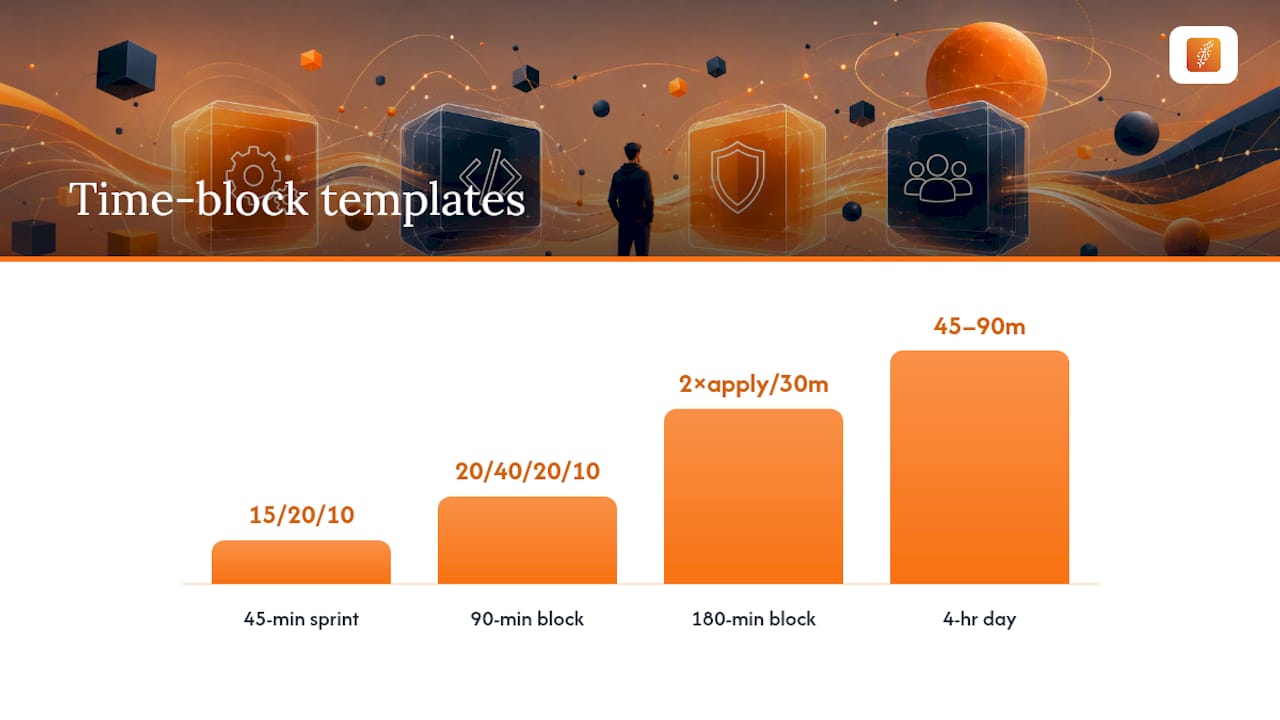
Here are four templates, sized to different situations.
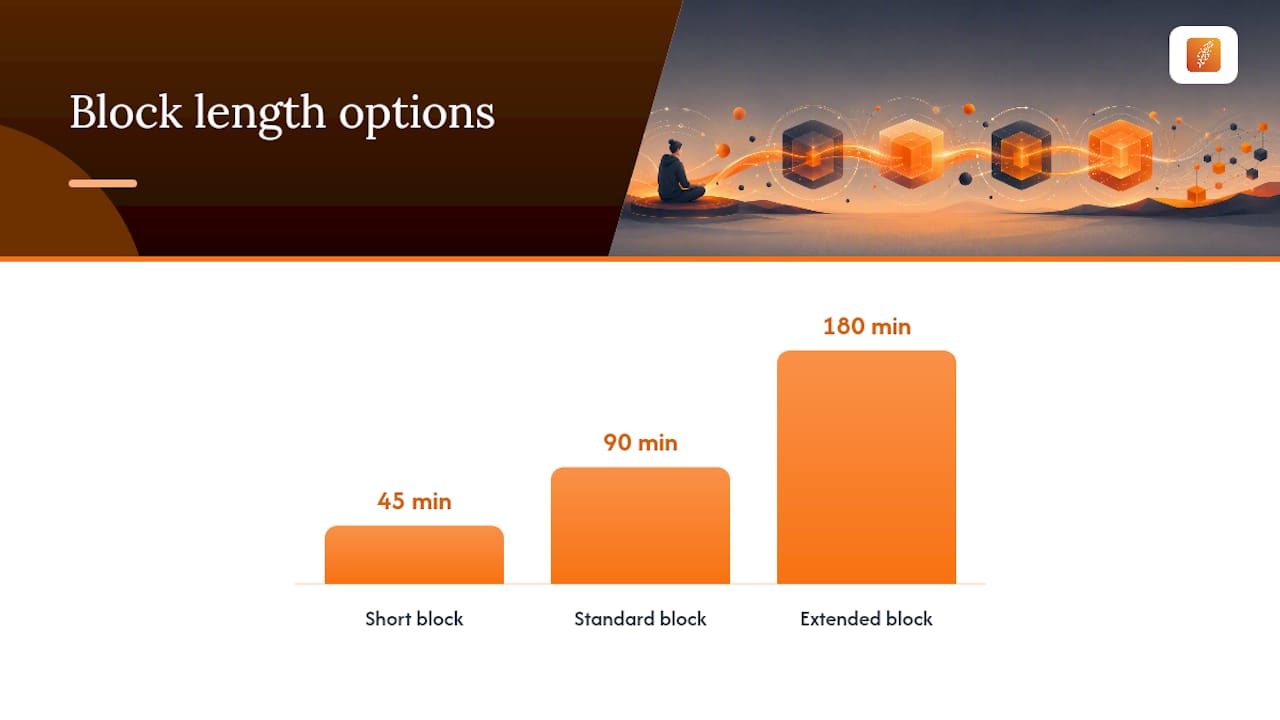
The 45-minute sprint. Good for early mornings before work or a lunch break. Spend 15 minutes triaging new postings, 20 minutes tailoring one application, and 10 minutes logging it in your tracker. No outreach in this window; it is too short to do it well.
The 90-minute block. The workhorse for most searchers with some daily flexibility. Split it 20/40/20/10: triage, apply to one role with a tailored resume, send one outreach message to a hiring manager or team lead, then log and pick tomorrow's first task.
The 180-minute (3-hour) block. Suited to a serious part-time push, often run once or twice a week. Two apply cycles instead of one, plus 30 minutes of skills practice or portfolio work layered in.
The 4-hour full-time day. A career coach's recommended structure for full-time searchers: four hours total, broken into 45 to 90-minute named blocks with real breaks between them, not eight or ten hours of grinding. The coach's specific advice: don't open email first thing. Rejection notices before 9 a.m. wreck the rest of the block.
A full-time weekly rhythm might run Monday through Friday, 9 a.m. to 1 p.m., with Wednesday afternoon reserved for interview prep and Friday afternoon left open. An employed searcher might run one 45-minute block most weekday evenings and a single 180-minute block on Saturday morning.
Morning or early afternoon blocks tend to produce sharper triage and better-written applications than late-evening sessions, when decision fatigue from the rest of the day has already set in.
How Do You Structure a Job Search Time Block?
Every block, regardless of length, runs the same four-step recipe. Practical routines built on 45, 90, and 180-minute options rely on this exact sequence because it forces triage before commitment and connection before you close the laptop.
- Triage. Scan new postings against three quick-fit signals: title match, required years of experience, and at least two must-have skills you actually have. Flag anything asking for a security clearance you don't hold or a tech stack you've never touched; skip it immediately rather than "maybe applying later."
- Apply. One resume, one cover note, one role. Don't mass-apply inside this step. Tailor the resume's top third to mirror the posting's own language, since that's what most applicant tracking systems and human screeners scan first.
- Connect. One outreach message per block, sent to a hiring manager, recruiter, or someone on the team. Keep the template simple: name the role, name one specific thing about the team's work, and ask a direct question rather than "just checking in."
- Maintain. Log the application and the contact in your tracker. "Done" means the row has a status, a date, and a next action written down, not a blank cell you'll fill in later.
Pro Tip: End every block by writing down the first task for your next session, even one sentence. Restarting cold is where most time-blocked routines quietly die.
Lead with whichever step feels hardest that day. If outreach makes you anxious, do it second, right after triage, while your energy is still fresh.
Should You Time Block Your Search While Employed?
Yes, but the shape changes. Instead of one long daily block, run short evening sessions plus one longer weekend block.
build steady momentum without pulling focus away from your current job during work hours.A few boundaries matter more here than in a full-time search:
- Use a personal calendar and personal email for every search-related event; never sync interview invites to a company account or device.
- Set your LinkedIn activity broadcast off before you start applying, and avoid updating your headline until you're closer to leaving.
- Schedule interviews during lunch hours, before the workday starts, or by using PTO rather than disappearing from meetings.
- Cap your daily total at 45 to 60 minutes on weekdays. A second full-time job on top of your first one is how people burn out twice as fast.
- Keep at least one full weekend day off from the search entirely. Momentum survives a pause; it rarely survives nonstop pressure.
What Tools Make Time Blocking Easier?
The routine only sticks if the setup around it removes friction. Start with your calendar: color-code triage, apply, connect, and maintain blocks differently, make them repeating events, and build five to ten-minute buffers before and after each one so a slow triage session doesn't bleed into your next meeting.
Alerts matter almost as much as the blocks themselves. A step-by-step guide to setting up job alerts makes the triage step faster because new postings land pre-filtered by title and keyword instead of forcing you to scroll a general board from scratch. Set a do-not-disturb window around your maintain step too, so notifications don't turn a five-minute log into a fifteen-minute distraction.
Your tracker needs only five fields to be useful: role and company, resume version used, current stage, date of last contact, and next action. Anything more elaborate usually goes unused by week two. If you want a ready-made structure instead of building one from scratch, a checklist built for IT job applications covers the apply step in detail, and a guide on managing job search data effectively walks through pipeline maintenance for people tracking more than a handful of applications at once.
How Do You Review a Week of Job Search Progress?
Ten minutes, once a week, same day and time. A controlled weekly review that logs process outcomes rather than waiting on inbox replies gives you a scoreboard you actually control, since reply rates depend on employers, not you.
Log four things: tailored applications sent, human contacts made, interviews scheduled, and one skill you practiced. These are process metrics, and they matter more short-term than outcome metrics like offers, because you can't control replies but you can control effort.
Weekly checklist:
- Count completed, tailored applications (not mass-applies)
- Count new human contacts, not just connection requests accepted
- Note interviews scheduled or completed
- Note one skill or portfolio item you advanced
Pick one variable to test next week. Maybe that's outreach template wording, or moving your block from evening to morning. If you completed under half your planned blocks two weeks running, shrink the routine rather than pushing through. If you're finishing early with energy left over, that's your signal to add a fifth block or extend one by 15 minutes.
Why Do Time-Blocked Job Searches Fail?
Most routines collapse for a handful of predictable reasons, and each has a quick fix.
- Chasing volume instead of fit. Applying to 30 roles a week with a generic resume produces worse results than 8 tailored ones. Shrink your triage filters, not your effort.
- Skipping the block when motivation dips. Cut the block to 20 minutes instead of skipping it entirely. A short session beats zero sessions for keeping the habit alive.
- Logging nothing, then losing track of who you've contacted. If your tracker feels heavy, cut it to the five fields above; a tool you skip is worse than no tool.
- Guilt-driven restarts after a pause. If you paused for two weeks, restart at half your old block length for the first week. Don't try to make up lost time by doubling hours.
Pro Tip: If you dread starting a block, swap the task order. Doing "connect" first instead of "triage" often breaks the inertia faster than staring at another job board.
Why These Templates Reflect Real IT and Cybersecurity Search Patterns
These block structures come from patterns that hold consistently across technical hiring: recruiters respond faster to tailored outreach than cold applications, and ATS systems reward keyword-matched resumes over generic ones. Diego, who writes on job search strategy for Pluckjobs, has covered these mechanics in more depth in a piece on applying to tech jobs strategically and a broader job search strategy guide for IT and cybersecurity professionals.
Pluckjobs itself is built around two of these blocks directly: AI-powered role discovery that shortens triage, and hiring manager contact data that makes the connect step possible without hours of manual LinkedIn digging. For a rundown of what typically derails technical searches, see common IT job search mistakes to fix.
A Realistic Take on Time Blocking Your Search
Most people who try time blocking quit in week two because they built a routine for their best day, not their average one. A block schedule survives only if it can absorb a bad Tuesday without collapsing entirely. Give any routine three full weeks before you decide it isn't working. Two weeks is barely enough time to build the habit, let alone judge its results.
— Diego
Let Pluckjobs Shorten Your Triage Step
The triage block eats more time than any other part of a job search, mostly because most job boards weren't built for technical roles. Pluckjobs uses AI-powered role discovery and Apollo-backed hiring manager contact data to hand you a shorter, sharper list of matches, plus the actual person to reach out to during your connect block.
Drop Pluckjobs into your triage step and you skip the manual scanning and guesswork of finding who actually owns a role at a target company. Instead of spending 20 minutes hunting for a hiring manager's name, you spend that time writing the message. Start a free trial at Pluckjobs and run your next triage block with a matched list already in hand.
Sources
- A career coach recommends a four-hour, burnout-proof job application routine — Business Insider
- Sustainable Job Search Week — Structure Guide | GyanBatua AI
- Daily Job Search Routine Without Burnout | ApplyArc
- Job Search Success: The Power of Time Blocking — LinkedIn
FAQ
Does Time Blocking Actually Work for Job Searches?
Yes. Fixed blocks that pair triage with tailored applications and outreach produce more targeted results than open-ended searching, largely because they force quality control before you hit submit.
What Is the Best Time-Block Schedule for a Full-Time Search?
A 4-hour day split into 45 to 90-minute blocks, with real breaks between them, is the coach-recommended structure for sustaining a full-time search without burning out.
How Do I Time Block My Search While Working Full-Time?
Run short 45-minute evening blocks on weekdays and one longer 180-minute block on a weekend day, using personal devices and accounts to keep your search private.
What Should I Track in My Weekly Job Search Review?
Log tailored applications sent, new human contacts made, interviews scheduled, and one skill practiced. These process metrics are more reliable week to week than waiting on replies.
Can a Tool Speed Up My Triage Block?
Yes. Platforms like Pluckjobs use AI-powered role discovery and hiring manager contact data to shorten the triage step, which is typically the most time-consuming part of any search block.