
Triage recruiter messages first: reply only to outreach that earned your time, then use one of three short scripts. A personalized message naming your role, company, and a rough comp range deserves a real reply. A generic "I came across your profile" blast does not.
The one rule: Match your reply effort to the recruiter's effort. Personalized outreach gets a thoughtful response. Template spam gets silence or a two-liner.
Here are four copy-paste replies you can send right now:
- Interested: "Thanks for reaching out. The role sounds like a strong fit for my background in [X]. I'd like to learn more before committing to a call. Could you share the comp band, remote/onsite setup, and a full JD?"
- Curious but need details: "Thanks for the message. I'm selectively open to the right opportunity. Before scheduling, could you share the salary range, team size, and whether this is remote-friendly?"
- Not interested, keep door open: "Thanks for thinking of me. This particular role isn't the right fit right now, but I'd welcome a conversation if something closer to [X] comes up."
- Hard pass: "Thanks for reaching out. I'm not exploring new roles at this time and don't expect that to change soon. Best of luck filling the position."
Key Takeaways
Triage recruiter messages by effort level, reply within 24–48 hours to relevant outreach, and always ask for comp band and role details before agreeing to a call.
| Point | Details |
|---|---|
| Triage first | Reply only to personalized outreach; mass templates with no company name or role title don't require a response. |
| Reply within 24–48 hours | Prompt replies signal professionalism; send a quick acknowledgement if you need more time to decide. |
| Ask comp and scope upfront | Request salary band, remote/onsite setup, and team size before committing to a screening call. |
| Decline with a future hook | A two-line polite decline that names what you'd consider keeps you on the recruiter's radar. |
| Pluckjobs for IT/cybersecurity | Pluckjobs generates targeted recruiter replies and surfaces hiring manager contacts for IT and cybersecurity roles. |
Table of Contents
- What are the best ready-to-send templates for responding to recruiter messages?
- How should you reply to a recruiter depending on the platform?
- If you're interested: templates and a pre-call checklist
- How do you ask about salary and role details without losing leverage?
- How to decline a recruiter politely while keeping the door open
- How and when to ask about salary, location, and role scope
- What is the right follow-up cadence after a recruiter goes silent?
- What should your email subject line and signature look like?
- Tone, length, and content: what to include and what to avoid
- Why these templates work: what recruiters actually track
- How to customize your reply based on the recruiter's industry or role
- How to handle multiple recruiter messages at the same time
- What most candidates get wrong about recruiter replies
- Plucky AI helps you craft targeted replies and find the right contacts
- Sources
- FAQ
What are the best ready-to-send templates for responding to recruiter messages?
These templates cover the most common scenarios. Keep them under 150 words and adapt the bracketed fields before sending, per CareerBldr's timing and length guidance.
Very interested
Interested but want details first
"Hi [Name], the opportunity sounds relevant. Before I commit to a call, could you share the salary range, remote/onsite expectations, and team structure? That'll help me come prepared and make the best use of both our time."
Polite decline
"Hi [Name], thanks for thinking of me. This role isn't the right fit at the moment, but I appreciate you reaching out. Please keep me in mind if something in [area/seniority] opens up."
Not looking now, open later
"Hi [Name], I'm not actively searching right now, but I'd be open to staying in touch. Feel free to reach out if a [role type] role comes up at a [stage/size] company."
Referral offer
"Hi [Name], this particular role isn't right for me, but I know someone who might be a strong fit. Happy to make an introduction if you'd like. Just let me know."
Subject line examples for email replies:
- Re: [Role Title] Opportunity at [Company]
- Following up: [Role] inquiry
- Re: Your message about [Role] at [Company]
Opening lines by seniority:
- Junior: "Thanks for reaching out. I'm actively exploring roles in [domain] and would love to learn more."
- Mid-level: "Thanks for the message. I'm selectively open and want to make sure there's a strong fit before we connect."
- Senior: "Thanks for reaching out. I'm thoughtful about new opportunities. A few details would help me assess fit quickly."
How should you reply to a recruiter depending on the platform?
The channel shapes the reply. LinkedIn InMail, email, SMS, and voicemail each carry different expectations, and misreading them costs you credibility before the conversation starts.
LinkedIn and InMail
Keep replies to 3–5 sentences. Recruiters on LinkedIn scan fast, and a wall of text signals low self-awareness. Reply within 24–48 hours when the role is relevant. If a recruiter's profile shows no company affiliation, no mutual connections, and a very thin history, treat that as a signal to verify before engaging. Check that the company name in the message matches a real LinkedIn company page. For IT-specific outreach patterns, understanding IT recruiter outreach types helps you read the message before you reply.
Move the conversation to email when you're ready to share a resume, discuss comp in detail, or schedule a formal call. LinkedIn is fine for the initial exchange; email is better for documentation and follow-up.
Use a clear subject line (see Section 9 for examples). Keep the body under 150 words. Always include a professional signature with your phone number, LinkedIn URL, and a one-line role descriptor. Avoid attaching your resume in the first reply unless the recruiter specifically asked for it. Sending an unsolicited attachment can trigger spam filters and looks presumptuous.
SMS and phone/voicemail
If a recruiter texts you, match their brevity. A two-sentence reply is appropriate: confirm you received the message and offer a time to talk or ask for an email. Never share salary history, personal details, or login credentials over SMS.
For voicemail, leave your name, the role you were contacted about, your callback number spoken slowly, and a one-sentence signal of interest or decline. Keep it under 30 seconds.
Dos and don'ts by platform:
- LinkedIn: Do reply promptly; don't send your resume unprompted.
- Email: Do use a professional signature; don't write more than 150 words in the first reply.
- SMS: Do confirm receipt and offer a next step; don't share sensitive personal data.
- Voicemail: Do state the role name; don't leave a message longer than 30 seconds.
Pro Tip: Before replying to any recruiter, spend 60 seconds verifying their profile: check that their LinkedIn shows a real company, a photo, and at least a few connections. Scam outreach often lacks all three.
If you're interested: templates and a pre-call checklist
A strong "interested" reply does two things at once: it signals genuine enthusiasm and screens for fit before you invest an hour on a call. Standout's triage framework recommends asking for comp band, funding stage, and team size in the initial reply, which protects your time and gives you market intelligence regardless of outcome.
Five-sentence template:
"Hi [Name], thanks for reaching out about the [Role] at [Company]. My background in [skill/domain] maps closely to what you've described. Before we schedule, could you share the comp band, remote/onsite setup, and a link to the full job description? That'll help me come to the call prepared. I'm available [day/time range] if those details check out."
Pre-call checklist: confirm these before you agree to a screening:
- Comp band (base + equity or OTE if applicable)
- Full job description or at minimum a scope summary
- Remote, hybrid, or on-site requirement
- Reporting line and team size
- Interview timeline and number of rounds
Scheduling language that signals selective enthusiasm:
"I'm available Tuesday or Wednesday afternoon next week. If those don't work, send over a few times and I'll confirm within the day."
Avoid "I'm free anytime." It signals low demand. Offer two specific windows instead.
How do you ask about salary and role details without losing leverage?
Ask early. Waiting until a final-round interview to discuss comp is the single fastest way to waste three weeks of your time. Superpower Resume's scenario templates recommend requesting salary range, team structure, and remote/onsite status before agreeing to a screening call.
Short question templates:
- "Could you share the base salary range or total comp band for this role?"
- "Is this position fully remote, hybrid, or on-site? If hybrid, how many days on-site per week?"
- "What's the team size and who does this role report to?"
- "Is there a full job description available, or can you share the key responsibilities?"
- "What's the expected interview timeline from first call to offer?"
Protecting your leverage on current salary:
If a recruiter asks what you currently make, deflect cleanly: "I'm focused on finding the right fit at market rate. What's the budgeted range for this role?" Most states have salary history ban laws that prevent employers from requiring this information, so you are not obligated to share it.
When to stop engaging:
If a recruiter refuses to share a comp range after two direct asks, that is a red flag. Legitimate recruiters know the budget. Withholding it past the first exchange usually means the range is below market or the role is poorly defined. Politely disengage: "Thanks for your time. I need a comp range before investing further. Feel free to reach out if that information becomes available."
How to decline a recruiter politely while keeping the door open
A two-line decline is all you need. The goal is to thank the recruiter, state the lack of fit briefly, and leave a hook for future contact. The Muse's LinkedIn guide notes that brief, professional replies keep you on a recruiter's radar for better-fit roles over time.
Decline template 1 (not the right role):
"Hi [Name], thanks for reaching out. This particular role isn't the right fit for where I am right now, but I'd welcome a conversation if something in [area/level] opens up. Best of luck filling this one."
Decline template 2 (not looking at all):
"Hi [Name], thanks for thinking of me. I'm not exploring new opportunities at the moment. I'll keep your contact in mind if that changes."
Referral template:
"Hi [Name], this role isn't right for me, but I know a colleague who might be a strong match. Before I make an introduction, I want to confirm they're open to it. If you'd like me to follow up, let me know."
Always check with your colleague before sharing their name. Sending an unsolicited referral without consent damages both relationships. For more on declining a job offer professionally, the same principles of brevity and warmth apply.
When silence is acceptable:
Mass template outreach with no company name, no role title, and no personalization does not require a reply. If the message could have been sent to 500 people unchanged, you owe it nothing.
How and when to ask about salary, location, and role scope
The right moment to ask about comp is the first reply, not after a screening call. Waiting signals that you either don't know your market value or you're hoping the process will make you too invested to walk away. Neither is a good look.
Scripts to request comp and scope:
- "What's the total comp range, including base and any equity or bonus?"
- "Is the role fully remote, or is there an on-site requirement? If hybrid, which city?"
- "What funding stage is the company at, and how large is the engineering/security team?"
- "Who does this role report to, and how is success measured in the first 90 days?"
If a recruiter responds with "it depends on experience" without a range, push once: "Understood. What's the budgeted range for a candidate at the target experience level?" That phrasing is direct without being confrontational.
Red-flag language to watch for:
- "Comp is competitive" with no numbers
- "We'll discuss salary later in the process"
- Refusal to name the company before a call
Any of these warrants a pause. You can reply: "I appreciate the interest. I need a comp range and company name before scheduling. Happy to connect once those are available."
What is the right follow-up cadence after a recruiter goes silent?
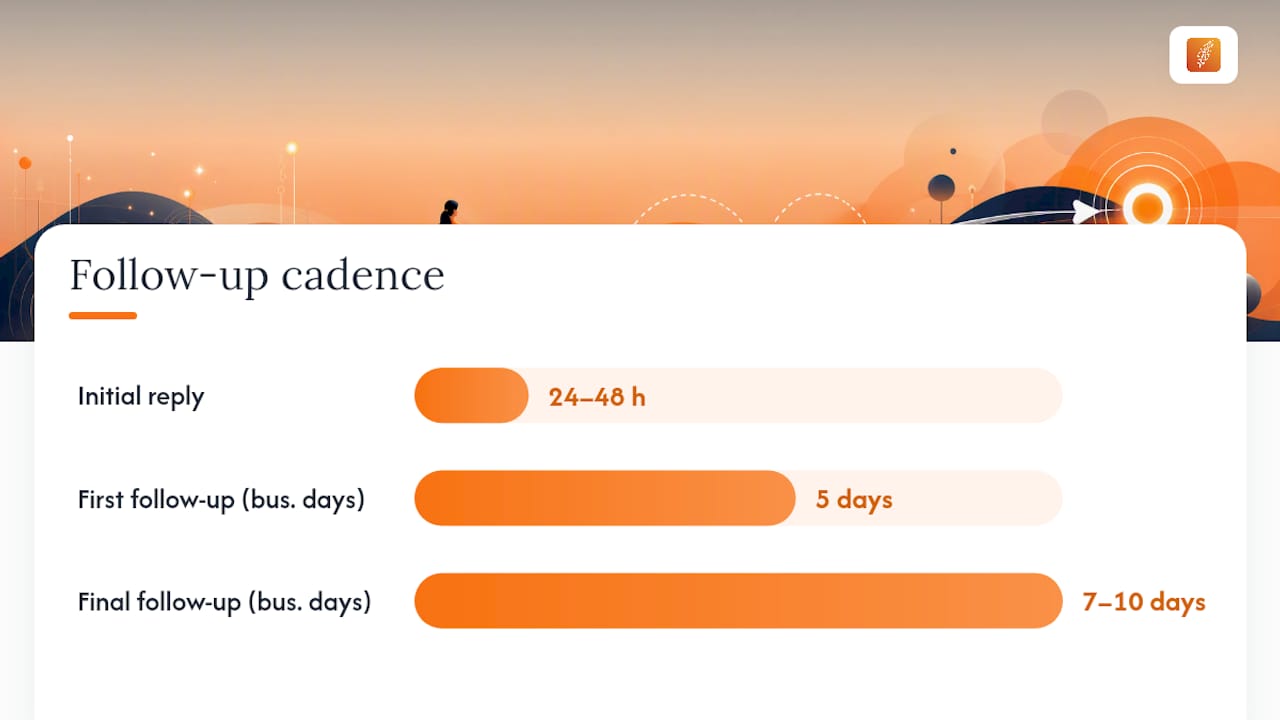
Reply within 24–48 hours when a role interests you. If you need more time, send a quick acknowledgement with a commit-by date: "Thanks for reaching out. I'll review the details and follow up by [day]." That single line prevents the recruiter from moving on while you're still deciding.
Follow-up cadence:
| Stage | Timing | Action |
|---|---|---|
| Initial reply | Within 24–48 hours | Respond or send acknowledgement |
| First follow-up | 5 business days after no response | One short follow-up message |
| Final follow-up | 7–10 business days after first follow-up | One closing note, then stop |
Re-engagement templates after silence:
After recruiter goes quiet post-initial reply: "Hi [Name], just following up on my message from [date]. Still interested in learning more about the [Role] if it's still open. Let me know either way."
After a longer gap (weeks): "Hi [Name], I know some time has passed since we last connected. If the [Role] is still active or a similar position has opened, I'd welcome a quick conversation."
For deeper context on why recruiters go silent and how to avoid triggering it, why IT job seekers get ghosted covers the real patterns.
When to stay silent:
Stop following up after two unanswered messages. Three or more follow-ups signals desperation and can permanently close a door. If the recruiter was handling a role that's now filled, a gracious close is better: "No worries if the role is filled. I'd welcome staying in touch for future openings."
What should your email subject line and signature look like?
Subject lines do one job: get the email opened. Keep them under 60 characters and make the role or context obvious.
Subject line examples:
- Candidate-initiated:
Following up: [Role Title] at [Company] - Reply to recruiter:
Re: [Role Title] — [Your Name] - Cold outreach to recruiter:
[Role type] candidate — [Your Name], [X] years in [domain]
Opening lines that set tone fast:
- "Thanks for reaching out about the [Role] at [Company]."
- "I saw your message and wanted to follow up promptly."
- "I'm selectively open to new opportunities and your message caught my attention."
Compact signature template:
[Your Name] [Role Descriptor, e.g., "Senior Cloud Security Engineer | 8 years in AWS and zero-trust architecture"] [Phone] | [Email] | [LinkedIn URL] [City, State] — Open to remote
Keep the signature to four lines maximum. A long signature with multiple logos or social icons looks cluttered and can trigger spam filters in some email clients.
Tone, length, and content: what to include and what to avoid
The fastest way to lose a recruiter's interest is a reply that's either too long or too generic. Duke Career Hub's sample responses emphasize professional phrasing and concise structure as the baseline for any recruiter reply.
Dos:
- Keep replies under 150 words for the first exchange.
- Open with a one-line current-state summary: "I'm actively looking" or "I'm selectively open."
- Ask your two or three most important questions in the same message.
- Mirror the recruiter's level of formality. A casual InMail gets a conversational reply; a formal email gets a formal one.
- Personalize at least one detail: the company name, the role title, or a specific skill they mentioned.
Don'ts:
- Don't share your current salary. Deflect with a target range instead.
- Don't agree to an immediate interview without getting the basics first.
- Don't copy a template verbatim without changing at least the role name and one specific detail.
- Don't write more than two paragraphs in a first reply.
- Don't use a generic opener like "I hope this message finds you well."
Pro Tip: Before replying, spend 30 seconds on the recruiter's LinkedIn profile. Check for a real company affiliation, a profile photo, and at least 50 connections. A profile with none of these is a scam signal, not a job opportunity.
Why these templates work: what recruiters actually track
Recruiters manage high-volume pipelines. A reply that's concise, personalized, and asks one or two smart questions stands out immediately because most candidates either don't reply at all or send a wall of text.
ConnectSafely's signal-based evaluation framework identifies four attributes that separate strong outreach from weak: personalization, role clarity, company naming, and compensation mention. The same logic applies in reverse. A candidate reply that mirrors those signals, naming the role, referencing a specific skill, and asking a targeted question, reads as high-quality to a recruiter scanning dozens of responses.
What recruiters notice: A reply that names the role, references one specific skill, and asks a single smart question takes under 30 seconds to read and signals a candidate who respects both parties' time. That's the reply that gets a same-day callback.
Response speed also matters. Replying within 24–48 hours signals that you're organized and engaged, two traits recruiters use as proxies for how you'll behave on the job. A candidate who takes a week to reply to a simple message raises questions about responsiveness in a real role.
Short screening questions also give you market intelligence. Asking for comp band and team size in the first reply, as Standout recommends, tells you the salary range for that role at that company regardless of whether you take the job. Over several conversations, that data builds a real-time picture of market rates in your specialty.
How to customize your reply based on the recruiter's industry or role
A template is a starting point, not a finished reply. The single edit that most improves a recruiter reply is replacing a generic skill reference with one that matches the recruiter's specific domain.
For a cybersecurity role, swap "[skill]" for something concrete: "my background in SIEM implementation and SOC operations" instead of "my technical experience." For a cloud infrastructure role, name the stack: "AWS and Terraform" instead of "cloud platforms." Recruiters who specialize in a domain recognize the vocabulary immediately, and it signals that you read the message rather than firing off a mass response.
Check the recruiter's own LinkedIn profile and company page before replying. A recruiter at a Series B fintech startup cares about different signals than one at a Fortune 500 defense contractor. The former wants to know you can move fast and wear multiple hats; the latter wants compliance awareness and clearance eligibility. One sentence that acknowledges the company's context, "I've followed [Company]'s work in [area] and the scope here aligns with where I want to go next," adds credibility that no template can replicate.
For IT professionals specifically, using LinkedIn effectively for IT job searches covers how to align your profile signals with the outreach you're receiving, which makes customization faster.
How to handle multiple recruiter messages at the same time
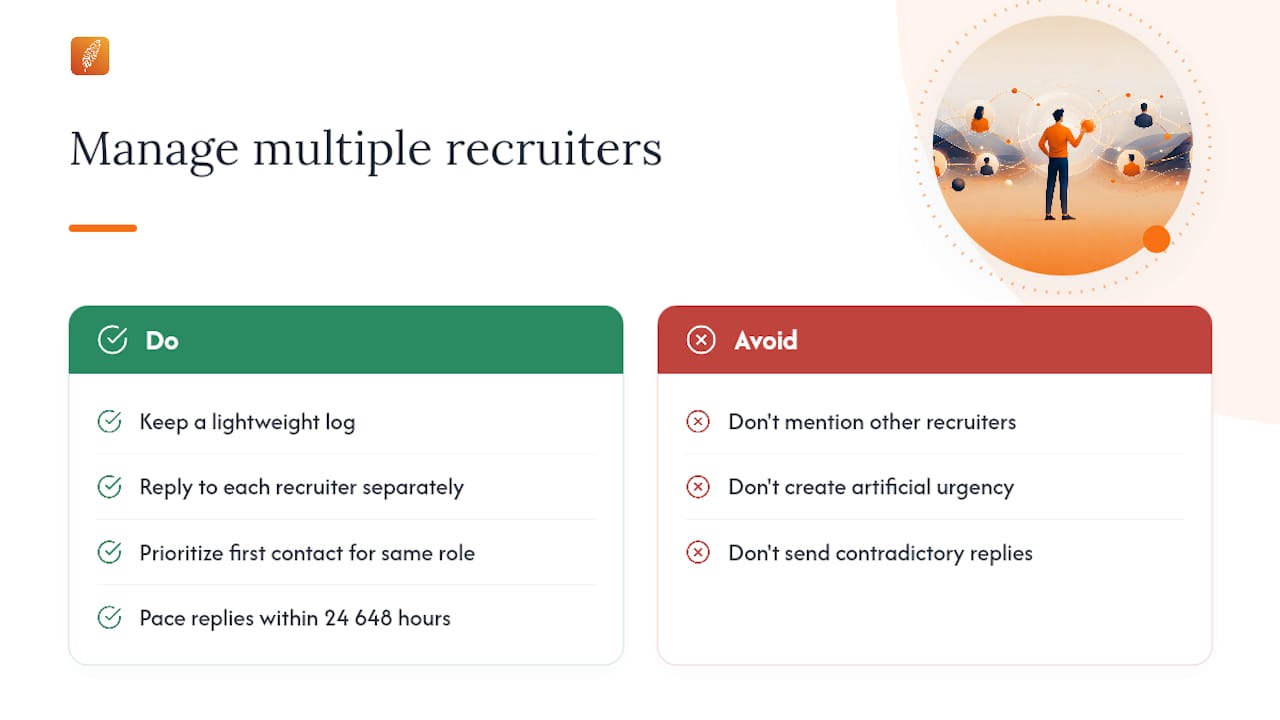
Managing several active recruiter conversations without burning bridges requires a simple tracking system and consistent response timing. The goal is to stay organized enough that no recruiter feels ignored and no opportunity gets accidentally closed.
Keep a lightweight log: recruiter name, company, role, date of first contact, and current status. A spreadsheet or a notes app works. The point is to avoid the embarrassing situation of replying to the same recruiter twice with contradictory information, or forgetting to follow up on a role you were genuinely interested in.
When multiple recruiters contact you about similar roles, reply to each independently and do not mention the others. Saying "I'm also talking to [Competitor Company]" is not leverage at the initial stage; it's noise. Leverage comes later, when you have competing offers in writing.
If two recruiters are working on the same role at the same company, reply to the first one who contacted you and politely let the second know: "I'm already in conversation with someone at [Company] about this role. I'll reach out if that changes." That reply protects both relationships. For guidance on reaching hiring managers directly when recruiter conversations stall, that approach can run in parallel without conflict.
Pace your replies so you're not creating artificial urgency. If three recruiters message you on the same day, you don't need to reply to all three within the hour. Responding within 24–48 hours to each is professional and gives you time to research each company before committing to a tone.
What most candidates get wrong about recruiter replies
The conventional advice is to always reply, always be polite, and always express some level of interest. That's not wrong, but it misses the more useful point: your reply is a screening tool, not just a courtesy.
Most candidates treat recruiter outreach as something that happens to them. The better frame is that you're running a parallel process. Every reply is a chance to extract market data, test a recruiter's quality, and position yourself accurately. A recruiter who can't answer basic questions about comp and scope after two asks is telling you something important about how the company operates. That information is worth having even if you never take the role.
The other underrated move is the polite decline with a referral offer. Most candidates either ghost a recruiter they're not interested in or send a flat "not interested" reply. A brief "this isn't right for me, but I know someone who might be" takes 20 seconds to write and leaves a genuinely positive impression. Recruiters remember candidates who help them, and that memory pays off when a better role opens up six months later.
Plucky AI helps you craft targeted replies and find the right contacts
Responding well to recruiter messages is only half the equation. The other half is knowing which roles are worth your time and who to contact when they are.
Pluckjobs combines AI-powered reply suggestions with SerpAPI-driven role discovery and Apollo contact intelligence, so you can identify the right opportunity, find the hiring manager's direct contact, and send a targeted reply, all from one platform. For IT and cybersecurity professionals who want precision over volume, Plucky AI generates tailored application materials and outreach copy aligned to your specific background, not a generic template. No cold applying. No guessing at comp ranges. Start your free trial at Pluckjobs and generate your first targeted recruiter reply in minutes.
Sources
The following sources informed the templates and guidance throughout this article:
- How to Respond to a Recruiter on Linkedin—Whether You’re Interested or Not | The Muse
- How to Respond to Recruiters on LinkedIn (Templates for Every Scenario) | Superpower Resume
- How to Respond to a Recruiter (samples) - Duke Career Hub
- How to Respond to Recruiters on LinkedIn (Templates) (2026) | ConnectSafely
Pluckjobs resources for IT and cybersecurity professionals:
FAQ
How do I respond to a recruiter's message?
Reply within 24–48 hours with a concise message under 150 words: thank the recruiter, signal your interest level, and ask for the comp band and job description before agreeing to a call.
How do I reply to a recruiter when I'm not interested?
Send a two-line decline that thanks the recruiter and names what you'd consider in the future. That keeps the relationship open without committing your time.
What should I say when first messaging a recruiter?
State your current status in one line ("I'm actively looking" or "I'm selectively open"), reference the specific role or company they mentioned, and ask one or two targeted questions about comp or scope.
How do I respond professionally to a recruiter email?
Use a clear subject line (e.g., "Re: [Role Title] at [Company]"), keep the body under 150 words, include a professional four-line signature, and avoid attaching your resume unless the recruiter asked for it.
Can I ignore recruiter messages?
Mass template outreach with no company name, no role title, and no personalization is acceptable to ignore. Personalized outreach from a real recruiter at a named company warrants at least a brief reply, even a polite decline.