
TL;DR:
- Finding a hiring manager's email first requires identifying the correct decision-maker to avoid wasted outreach efforts. Verifying guessed email addresses ensures deliverability and protects sender reputation in outreach campaigns. Personalized, concise messages with a specific call to action increase response rates from IT and cybersecurity professionals.
Finding a hiring manager's email address is the fastest way to bypass applicant tracking systems and get your resume in front of the person who actually controls the hire. For IT and cybersecurity job seekers, direct outreach is not optional. Roles in cloud security, DevSecOps, and network engineering attract hundreds of applicants through standard portals. The professionals who get interviews are often the ones who contact hiring managers directly. This guide covers how to identify the right person, find their verified email, and write an outreach message that earns a response.
How to find hiring manager email addresses: start with the right person
The single biggest mistake IT job seekers make is searching for an email before they know whose email they need. Identifying the correct hiring manager is a separate step from finding their contact details. Skipping it wastes time and sends your outreach to the wrong inbox.
LinkedIn job postings identify hiring manager names but rarely include emails. The job poster listed on a LinkedIn role is almost always a recruiter or HR coordinator, not the person who owns the team. Recruiters coordinate the hiring process, but the hiring manager owns the team and typically makes the final call. That distinction makes the hiring manager's contact far more valuable for direct outreach.
To find the actual decision-maker, use LinkedIn's People filter. Search for titles one level above the open role at the target company. For a senior security analyst position, search for titles like "Head of Security," "Director of Information Security," or "VP of Cybersecurity." For a DevOps or cloud engineering role, search for "Engineering Manager" or "Director of Platform Engineering." Filtering by department heads or directors increases your chance of reaching the actual decision-maker rather than a recruiter.
Job descriptions also contain clues about reporting structure. Phrases like "reports to the CISO" or "works closely with the VP of Engineering" tell you exactly which title to search for on LinkedIn. Read the full job description before you start any contact research.
Key steps to identify the right hiring manager:
- Search LinkedIn People with company name plus a senior title in the relevant department
- Look for titles one level above the posted role, not the same level
- Cross-reference the LinkedIn profile with the company's team or about page
- Confirm the person is active on LinkedIn within the last 90 days
- Avoid contacting HR generalists or talent acquisition coordinators as your primary target
Pro Tip: If the company has a public engineering blog or security research page, the authors are often senior engineers or managers. Their names give you a direct lead on who runs the team.
Methods for finding the email once you know the name
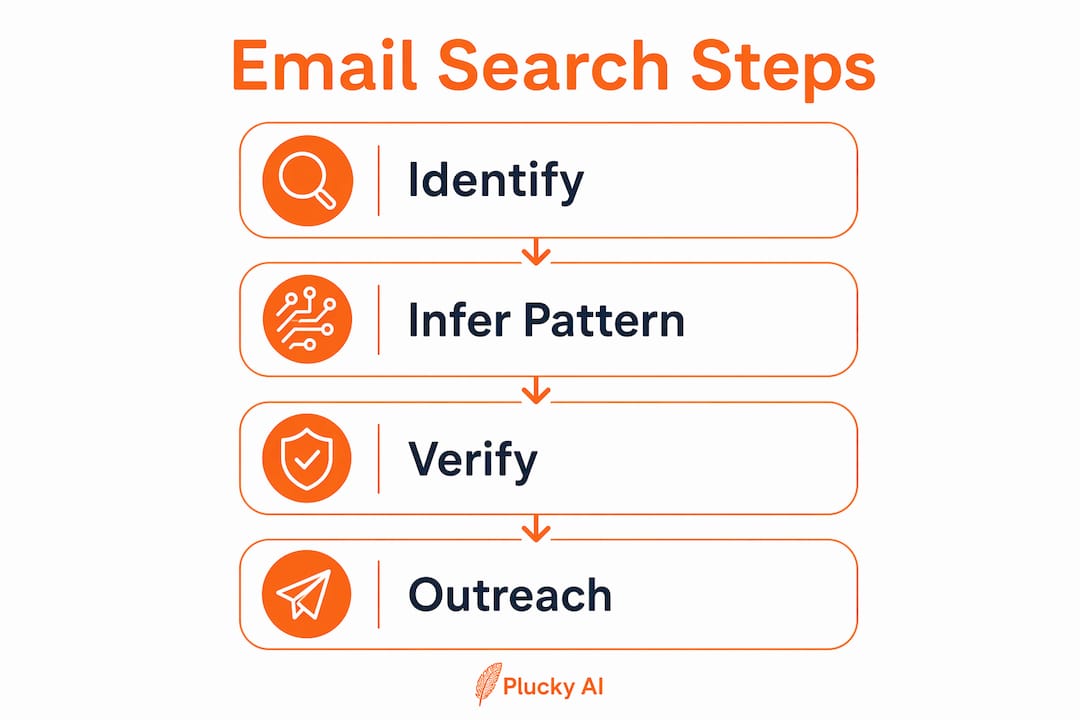
Once you have a name, the process of finding their email follows a clear sequence. Most companies use predictable email formats, but you need to verify every guessed address before sending to avoid delivery failures.
Step 1: Infer the company email pattern
Start by finding one confirmed email address from the company. Press releases, conference speaker bios, and blog author pages are the most reliable sources. A security researcher listed as a speaker at DEF CON or RSA Conference often has their company email published in the event program. That single address tells you the pattern the entire company uses.

Public emails from press releases are the best high-confidence anchors for inferring the rest of the company's email format. Common patterns include first.last@company.com, first@company.com, and flast@company.com. Once you identify the pattern, apply it to the hiring manager's name.
Step 2: Use LinkedIn and company websites
Check the hiring manager's LinkedIn profile for contact information. Some professionals list their work email directly in the "Contact Info" section. The company website's team page, security advisories, or press contact sections sometimes list direct emails for senior staff. GitHub profiles for engineering managers occasionally include professional contact details as well.
Step 3: Use a job posting URL lookup tool
Paste the specific job posting URL into a contact discovery tool. Pluckjobs combines Apollo contact intelligence with SerpAPI-powered role discovery to return verified hiring manager contact data directly from a job posting link. This approach cuts manual research time significantly for IT and cybersecurity job seekers.
Email discovery methods ranked by reliability:
| Method | Best for | Reliability |
|---|---|---|
| Press release or speaker bio email | Pattern inference | High |
| LinkedIn contact info section | Direct email | Medium |
| Company team or about page | Senior staff emails | Medium |
| Job posting URL lookup tool | Fast verified contact | High |
| Email pattern + name combination | When pattern is confirmed | Medium |
Pro Tip: Search the company domain on GitHub. Engineers and security professionals often commit code with their work email visible in commit history. That single confirmed address gives you the company's email pattern instantly.
Why email verification matters before you hit send
Verifying an email address before sending is not optional. Hard bounce rates above 2–3% can damage your sender reputation. If you are running any kind of outreach campaign across multiple roles, even a handful of bad addresses can trigger throttling on your email account.
Verification works in three technical steps, each of which you can understand without a networking background.
- MX record check: Confirms the company's domain is set up to receive email. If the MX record does not exist, no address at that domain will work.
- SMTP ping: Sends a test signal to the mail server without delivering a message. The server responds with whether the mailbox exists.
- Mailbox activity check: Confirms the address is active and not a dormant or abandoned account.
Email verification tools check domain MX records, mailbox activity, and differentiate role-based from personal emails. Role-based addresses like security@company.com or jobs@company.com go to a shared inbox. They are not useful for direct hiring manager outreach. Filter them out.
"Active evaluation of email verification results, like ignoring risky or invalid addresses, is necessary to protect sender reputation during job search outreach campaigns."
Hard bounces trigger throttling on most sending platforms. Pre-send verification is the industry standard for any outreach campaign, including individual job search efforts. Treat every guessed address as unverified until a tool confirms it.
How to email a hiring manager in IT and cybersecurity
A verified email address is only useful if the message attached to it earns a response. Effective outreach emails to hiring managers are brief and directly connect your skills to the role requirements with a clear call to action. Personalized emails get higher response rates than generic ones.
The structure of a strong cold outreach email has three parts. The opening names the specific role and shows you understand what the team does. The middle states one or two concrete qualifications that match the job description directly. The close asks for a specific next step, such as a 15-minute call, not a vague "I'd love to connect."
Common mistakes to avoid when you reach out to a hiring manager:
- Sending a message longer than five sentences without a clear ask
- Attaching a resume without a personalized note explaining why you are a fit
- Using a generic subject line like "Job Application" instead of the role title and your key skill
- Contacting the hiring manager and the recruiter simultaneously with the same message
- Following up more than twice without a response
Pro Tip: Send your outreach email on a Tuesday or Wednesday morning. Research on cold email response rates consistently shows midweek morning sends outperform Friday afternoon or Monday sends for professional audiences.
If you cannot find a direct email after exhausting the methods above, LinkedIn messaging is a credible alternative. Keep the message under 300 characters. Reference the specific role and one relevant credential. LinkedIn is not a complete substitute for direct email outreach, but it works when email discovery fails.
For a full picture of how to structure your outreach within a broader search plan, the IT and cybersecurity job search strategy guide covers targeting, timing, and follow-up in detail.
Key Takeaways
Finding a hiring manager's email address requires two separate steps: identifying the correct decision-maker first, then verifying their contact before any outreach.
| Point | Details |
|---|---|
| Identify before you search | Find the hiring manager's name and title before attempting any email discovery. |
| Use pattern inference | Confirm the company email format from press releases or speaker bios, then apply it to the target name. |
| Verify every address | Run every guessed email through a verification tool to avoid hard bounces and sender reputation damage. |
| Keep outreach concise | Write emails under five sentences with a direct skills match and a specific call to action. |
| Use LinkedIn as a backup | If email discovery fails, LinkedIn messaging is a credible fallback for IT and cybersecurity roles. |
What I've learned from watching IT job seekers get this wrong
Most IT and cybersecurity job seekers spend hours on job boards and almost no time on contact research. That ratio is backwards. A well-researched cold email to the right hiring manager at a company you genuinely want to work for will outperform 50 applications submitted through a portal.
The pattern I see most often is job seekers who find a name on LinkedIn, guess an email without verifying it, and then wonder why they never hear back. The email bounced. Their message never arrived. They assume the hiring manager ignored them, but the problem was technical, not personal.
Timing matters more than most people realize. A hiring manager who just posted a role is actively thinking about the problem that role solves. Reaching them in the first week of a posting, with a message that speaks directly to that problem, puts you in a completely different category from applicants who apply through the portal two weeks later.
Personalization is not about flattery. It is about specificity. Mentioning a specific project the company published, a CVE they responded to, or a technology stack listed in the job description tells the hiring manager you read the role carefully. That specificity is rare. It gets noticed.
Follow up once, seven to ten days after the first message. Keep it short. Reference your first email and restate your ask in one sentence. Most responses to cold outreach come after the first follow-up, not the initial message.
— Diego
Pluckjobs makes hiring manager outreach faster for IT pros
Finding verified contact data manually takes time that most job seekers do not have. Pluckjobs is built specifically for IT and cybersecurity professionals who want to move faster.
Plucky AI combines Apollo contact intelligence with SerpAPI-powered role discovery. Paste a job posting URL and get the hiring manager's verified contact data in seconds. The platform also generates tailored resumes matched to the role and supports personalized outreach workflows, all in one place. No cold applying. No guessing. Find the role, find the person, and get hired.
FAQ
How do I find a hiring manager's email address for free?
Start by inferring the company email pattern from a public address found in a press release or blog author bio, then apply that pattern to the hiring manager's name. Verify the resulting address with a free email verification tool before sending.
What is the difference between a recruiter and a hiring manager?
A recruiter coordinates the hiring process and screens candidates. The hiring manager owns the team, defines the role requirements, and typically makes the final hiring decision.
How do I verify a hiring manager's email address?
Use an email verification tool that checks the domain's MX record, sends an SMTP ping to confirm the mailbox exists, and flags role-based or inactive addresses. Hard bounce rates above 2–3% damage sender reputation, so verify before every send.
What should I write when I email a hiring manager directly?
Keep the message under five sentences. Name the specific role, state one or two qualifications that match the job description, and close with a clear ask such as a 15-minute call. Personalized emails consistently outperform generic outreach in response rate.
What do I do if I cannot find the hiring manager's email?
Send a brief LinkedIn message under 300 characters referencing the specific role and one relevant credential. LinkedIn messaging is a credible backup when direct email discovery fails, though it typically generates lower response rates than a verified direct email.