
TL;DR:
- LinkedIn is primarily used by recruiters to source IT candidates before roles are publicly posted, necessitating a strategic approach. Optimizing your profile with targeted headlines, skill endorsements, and recruiter-only Open to Work settings enhances visibility, while daily targeted searches and multi-step outreach sequences increase responses. Consistent, precise engagement transforms LinkedIn from a passive platform into an active tool for securing IT roles in 2026.
LinkedIn is a professional search engine used by over 85% of recruiters to source IT candidates before a role is ever posted publicly. That single fact changes how you should approach the platform entirely. To use LinkedIn for IT job search effectively, you need a three-layer system: an optimized profile that surfaces in recruiter filters, targeted job searches with active alerts, and personalized outreach that builds real connections. This article breaks down each layer with specific tactics built for IT and cybersecurity professionals competing in 2026.
How to use LinkedIn for IT job search: profile optimization that gets you found

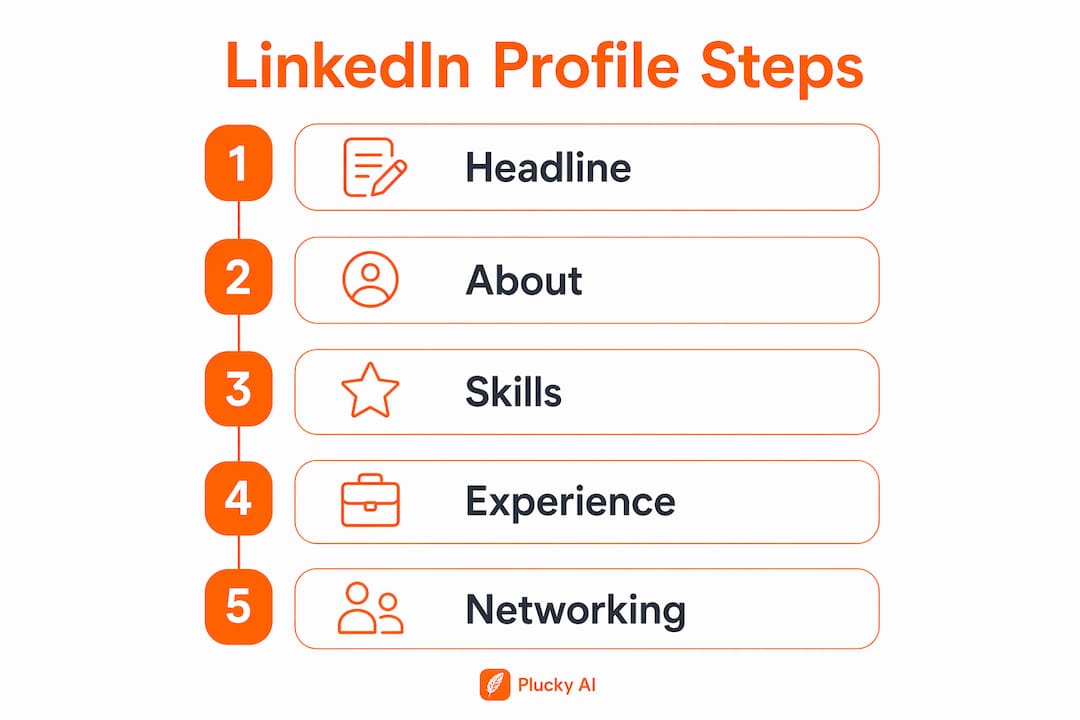
Your LinkedIn headline is the highest-value field for recruiter discovery. Generic headlines weaken keyword matching and push your profile down in filtered searches. A strong IT headline follows this structure: role title + specialty + one concrete value statement. "Cloud Security Engineer | AWS & Azure | Reducing Attack Surface for Mid-Market SaaS" beats "IT Professional Looking for Opportunities" in every recruiter search filter.
The About section matters too, but only the first two lines. Recruiters see those lines before clicking "see more," so front-load your specialization, years of experience, and the type of role you want. Think of it as a 30-word pitch, not a career autobiography.
Skill endorsements directly affect how LinkedIn's algorithm ranks your profile. Add the exact tools and certifications your target roles require: Splunk, Terraform, Kubernetes, CrowdStrike, CISSP, CompTIA Security+. These are not decorative. Recruiters filter by specific skills and location before a position is even posted, so your skills section is a searchability asset.
The Open to Work configuration is where most IT professionals make a costly error. Setting it to public visibility signals desperation to some hiring managers. The correct move is to set it to "Recruiters Only," then add multiple standardized job titles to the configuration. Open to Work with recruiter-only visibility and customized job titles increases interview opportunities significantly compared to leaving it at default settings.
- Write your headline as: [Role] | [Specialty/Stack] | [Value statement]
- Add 10 to 15 skills matching exact terms from job descriptions in your target roles
- Set Open to Work to "Recruiters Only" and include 5 to 7 standardized job titles
- Keep your About section's first two lines focused on role, specialization, and years of experience
- Align your current job title field with the role you want, not just the one you hold
Pro Tip: Mirror the exact phrasing from job descriptions in your headline and skills. If three postings say "cloud security engineer" and you write "cloud infrastructure security specialist," you may not appear in filtered searches at all.
How to set up LinkedIn job searches and alerts that actually work
Most IT professionals run one broad search and call it a strategy. That produces noise, not results. A daily 10-minute LinkedIn job board routine using targeted, saved searches drives recruiter visibility and improves your match ranking over time.
The search setup that works uses specific job titles rather than broad categories. Search for "SOC Analyst," not "cybersecurity." Search for "DevOps Engineer AWS," not "cloud engineer." Combine that with industry filters (Financial Services, Healthcare IT, SaaS) and location settings that include remote options. Save each search as an alert set to daily frequency.
Here is a structured approach to setting up your alert system:
- Identify your top three target roles. For example: Cloud Security Engineer, Security Architect, and DevOps Engineer.
- Create a separate saved search for each role. Use exact title, relevant industry, and preferred location or remote.
- Add adjacent title searches. A Cloud Security Engineer should also track "Infrastructure Security Engineer" and "Platform Security Engineer."
- Set up company-specific alerts. Follow 10 to 15 target companies and enable job notifications from their pages directly.
- Review alerts every morning. Spend five minutes on new matches and five minutes on saved jobs from the previous day.
| Search type | Example query | Alert frequency |
|---|---|---|
| Exact title | "SOC Analyst" + Financial Services + Remote | Daily |
| Adjacent title | "Threat Intelligence Analyst" + SaaS | Daily |
| Target company | CrowdStrike, Palo Alto Networks, Okta | Immediate |
| Broad backup | Cybersecurity + Mid-size companies + US | Weekly |
LinkedIn's AI-powered job matching improves when your profile and search inputs use consistent language. If your headline says "Cloud Security Engineer" and your searches target that exact title, the algorithm reinforces your relevance. Inconsistency between profile language and search terms dilutes your match score. Treat your profile and your searches as one connected system.
Effective LinkedIn outreach strategies to complement IT job applications
Submitting applications without outreach is the equivalent of mailing a resume to a post office box. LinkedIn job search success depends on combining profile optimization, targeted alerts, and personalized outreach into one coordinated workflow.
The data on outreach is sobering but instructive. Connection acceptance rates sit around 28 to 30%, but reply rates to connection request notes drop to just 2 to 3%. Message reply rates after acceptance are higher, around 10 to 11%. This means a single connection request with a note is not a strategy. A multi-step sequence is.
A practical outreach sequence for IT job seekers looks like this:
- Step 1: Send a connection request with no note, or a very brief one (under 300 characters) referencing a shared interest or mutual connection.
- Step 2: After acceptance, send a short message within 48 hours. Reference something specific: a project they led, a company initiative, or a role you saw posted.
- Step 3: If no reply within five to seven days, send one follow-up that adds value. Share a relevant article, ask a specific question, or mention a shared professional challenge.
- Step 4: Move on. Two messages after acceptance is the ceiling. Persistence beyond that damages your professional reputation.
Target hiring managers and current team members at companies you are actively applying to. A message to a Security Engineering Manager at a company where you just applied carries far more weight than a generic connection to a recruiter you found in a search.
Pro Tip: Before sending any outreach, look at the person's recent LinkedIn activity. Referencing a post they published or a comment they made in the past two weeks shows genuine attention and dramatically improves reply rates.
Aim for two to three targeted outreach sequences per week. Volume without precision produces nothing. Quality targeting, combined with a well-optimized profile, is what creates real momentum in an IT job search while employed or during an active search.
Common mistakes IT professionals make on LinkedIn and how to fix them
Treating LinkedIn like a job board and relying on Easy Apply repeatedly is the most widespread mistake IT professionals make. Easy Apply sends a generic application with no differentiation. Recruiters receive hundreds of these. Without a strong profile and a follow-up message, your application disappears.
The second most damaging mistake is misconfiguring Open to Work. Failing to configure Open to Work properly hides profiles from recruiters who are actively searching. Using only one job title, leaving geography too narrow, or setting it to public instead of recruiter-only all reduce your discoverability.
The biggest visibility mistake is not the one you can see. It's the Open to Work setting you configured once and never revisited. Recruiters search by title, and if your configuration lists only one title, you are invisible to searches for every adjacent role.
Other common errors include:
- Setting job alerts too broadly and then ignoring them because the volume is overwhelming
- Sending one connection request and expecting a reply, then concluding that outreach does not work
- Neglecting consistent activity. Commenting on posts from target companies and hiring managers keeps your profile visible in their feeds without requiring a direct message
- Skipping the skills section or leaving it with outdated tools. A profile listing only "Windows Server" and "Active Directory" in 2026 signals a candidate who has not kept pace with the field
A long-game job search strategy on LinkedIn requires weekly maintenance, not a one-time setup. Treat your profile as a living document and your outreach as a pipeline with stages, not a one-shot effort.
Key takeaways
LinkedIn job search effectiveness for IT professionals depends on three synchronized actions: profile optimization for recruiter algorithms, targeted daily searches with saved alerts, and multi-step outreach sequences directed at hiring managers and team members.
| Point | Details |
|---|---|
| Headline drives discoverability | Write your headline as role + specialty + value statement using exact IT keyword terms. |
| Open to Work configuration matters | Set to Recruiters Only and add 5 to 7 standardized job titles to maximize profile matching. |
| Targeted alerts beat broad searches | Create separate saved searches for each target role and adjacent titles with daily alert frequency. |
| Multi-step outreach is required | Connection acceptance runs 28 to 30%, but reply rates demand follow-up sequences, not single messages. |
| Activity signals relevance | Commenting and posting consistently keeps your profile visible to hiring managers between applications. |
Why most IT professionals are using LinkedIn wrong
I have reviewed hundreds of LinkedIn profiles from IT professionals over the past several years, and the pattern is consistent. The profile was built once, the Open to Work badge was turned on, and then the person waited. That is not a strategy. That is hope.
What actually works is treating LinkedIn as a system with three moving parts that need weekly attention. The profile is not a resume you upload and forget. The job alerts are not a passive feed you scroll when bored. The outreach is not a numbers game where you blast connection requests and track acceptance rates.
The professionals I have seen land strong IT roles in 2026 share one habit: they spend 10 focused minutes on LinkedIn every morning. They check alerts, review two or three profiles at target companies, and send one quality message. That is it. No hours of scrolling. No mass applying. Just consistent, targeted action.
The other thing worth saying plainly: connection reply rates are declining. Around 2 to 3% of connection notes get a reply. That number should not discourage you. It should tell you that your outreach sequence needs to start after acceptance, not before. The connection request is just the door. The conversation happens after you walk through it.
If you are in cybersecurity specifically, the cybersecurity job titles list you use in your Open to Work configuration and saved searches matters more than most people realize. Recruiters search by exact title. One wrong word and you are invisible to a search that would have been a perfect match.
— Diego
How Pluckjobs makes your LinkedIn job search more precise
Pluckjobs is an AI-powered job search platform built specifically for IT and cybersecurity professionals. It combines Apollo contact intelligence with SerpAPI-powered role discovery to surface precision job matches, hiring manager contact data, and tailored resumes in one place. Where LinkedIn requires manual alert setup and cold outreach guesswork, Pluckjobs delivers the role, the hiring manager, and the outreach data together. IT professionals using Pluckjobs skip the cold-apply cycle entirely and move directly to targeted conversations with the right people. If you are serious about cutting your job search timeline, Pluckjobs is built for exactly that.
FAQ
How does LinkedIn help IT professionals find jobs?
LinkedIn gives IT professionals access to over 20 million active job postings and a recruiter network that filters candidates by skills, tools, and location before roles are publicly posted. Optimizing your profile for those filters is the primary lever for getting discovered.
What is the best way to set up Open to Work on LinkedIn?
Set Open to Work to "Recruiters Only" visibility and add five to seven standardized job titles that match your target roles. Public visibility can signal urgency to hiring managers, while recruiter-only keeps your search confidential and targeted.
How many LinkedIn connection requests should I send per week?
Send two to three targeted connection requests per week directed at hiring managers or team members at companies you are actively pursuing. Focus on quality targeting rather than volume, and always follow up with a personalized message after acceptance.
Should I use Easy Apply on LinkedIn for IT roles?
Easy Apply is useful for initial volume but should always be paired with direct outreach to a hiring manager or team member at the same company. Submitting through Easy Apply alone, without a follow-up message, produces low response rates in competitive IT hiring markets.
What LinkedIn profile elements matter most for IT recruiter searches?
The headline and skills section carry the most weight in recruiter filtering. Use exact role titles and tool names from current job descriptions, and keep both fields updated as your target roles evolve.