
Yes, AI can measurably improve your resume's ATS match rate and cut your tailoring time from hours to minutes, but only when you use tools that show section-level fixes instead of one vague score. The move: paste the job description into an ATS-aware optimizer, apply the specific edits it flags, verify the parsed output, and export a selectable-text PDF. Pluckjobs builds this exact sequence into its resume tool for IT and cybersecurity candidates.
TL;DR:
- Section-level ATS scoring helps identify exactly which parts of your resume need improvement rather than relying on a single overall score.
- Formatting issues like multi-column layouts, headers in headers or footers, and non-selectable PDFs can cause your resume to be silently rejected by ATS platforms.
- Applying AI-driven keyword and phrase matching, bullet rewriting, and section-specific fixes can reduce tailoring time from hours to minutes.
- Verifying parser output before exporting ensures your formatting and content land correctly in ATS systems across different platforms like Workday or Greenhouse.
- For technical roles, pairing AI optimization with role-specific language adjustments and skilled review prevents claims from becoming unsubstantiated or overly generic.
Table of Contents
- What AI Resume Optimization Actually Does
- How Do You Optimize a Resume With AI, Step by Step?
- ATS Formatting Rules That Prevent Silent Rejection
- How Do You Choose the Right AI Resume Tool?
- Why This Matters More for IT and Cybersecurity Job Seekers
- Where AI Helps Most, and Where to Slow Down
- Get Your Resume Optimized With Plucky AI
- Sources
- FAQ
What AI Resume Optimization Actually Does
AI resume optimization compares your resume against a specific job posting and tells you where the gaps are. That's the core function, and it breaks down into a handful of concrete tasks rather than one magic transformation.
The first is keyword and phrase matching. The AI scans the job description for hard skills, certifications, and role-specific terminology (think "Kubernetes" versus "container orchestration," or "SIEM" versus "security information and event management"), and flags which ones are missing from your resume. This is where resume keyword alignment does the real work: recruiters and ATS platforms often search for exact phrasing, so a resume that says "managed cloud infrastructure" when the posting says "AWS infrastructure" can get buried even when the underlying experience matches.
The second task is bullet rewriting. A decent AI tool takes a flat bullet like "responsible for network security" and pushes you toward something closer to "reduced unauthorized access attempts by hardening firewall rules across 40+ endpoints." It won't invent the 40 endpoints for you. It should prompt you for the real number and then handle the phrasing.
The third, and most underrated, is section-level ATS checking. Instead of a single opaque score of "72/100," a well-built tool tells you your summary is weak on keywords, your skills section is missing two required certifications, and your formatting is fine. That granularity is what makes the feedback usable. An open-source resume optimizer project built specifically around this pattern shows why: parsing engines behave differently across platforms like Workday, Greenhouse, and Lever, so a single score hides exactly where you're losing points.
Here's what to expect from a solid AI resume tool, and what to watch for:
- Keyword gap analysis: shows exactly which required skills from the posting are absent from your resume.
- Bullet-level rewrites: restructures weak statements around action and measurable outcome, using your real numbers.
- Section-by-section scoring: rates your summary, experience, and skills sections independently instead of collapsing everything into one number.
- Parsing error detection: flags formatting elements (tables, text boxes, headers) that break machine readability.
- Job title alignment: suggests how to phrase your current title so it matches industry-standard language without misrepresenting your role.
Pro Tip: If a tool gives you a single overall score and no breakdown, treat it as a rough gut check, not a diagnostic. You need to know which section is dragging the score down, not just that it's low.
None of this replaces judgment. AI models occasionally hallucinate skills or achievements if you let them, they can overfit toward keyword density at the expense of readability, and they have no way of knowing whether a claim is true. The tool proposes; you verify. That division of labor is the whole game.
How Do You Optimize a Resume With AI, Step by Step?
Tailoring a resume with AI works best as a repeatable five-step sequence, not a one-time cleanup. Here's the workflow that actually produces a job-ready document instead of a keyword-stuffed mess.
-
Start with a clean master resume. Before you touch any AI tool, get one base resume into single-column, plain-text-friendly format. No text boxes, no multi-column layouts, no embedded graphics. This is your source of truth. Every tailored version branches from it, a pattern that tools built around master-resume branching use specifically because it keeps your core facts consistent while letting details shift per posting.
-
Paste the job description in full. Don't summarize it or copy just the requirements list. Full postings include phrasing in the "about the role" and "responsibilities" sections that a good matcher will pick up and your resume should echo. Run the analysis and let the tool surface the keyword gaps and title mismatches.
-
Apply section-level fixes one at a time. Work through the summary, then experience, then skills. Add missing hard skills you genuinely have. Rewrite bullets to mirror the posting's language, but only where it's accurate. If the job wants "incident response" and you've been doing "threat mitigation," that's a legitimate swap. If the job wants five years of Terraform and you have one, don't let the AI paper over the gap.
-
Verify parser output before you trust the score. This is the step most job seekers skip, and it's the one that catches silent failures. A good tool will show you a preview of what a parser actually extracted from your resume, not just a score. If your job titles, dates, or skills section didn't land where expected, the formatting is the problem, not your content. Fix it, rerun the check, and confirm the score moved. A tool that tests output against real parsing engines like Workday, Greenhouse, and Lever, as practical ATS formatting research recommends, is more trustworthy here than one that just runs its own internal logic.
-
Export as a selectable-text PDF and log the version. Once you're satisfied, export it as a PDF with selectable text, never a scanned image or a design-heavy export that flattens text into pixels. Name the file with the company and role, and keep a short note on what you changed (which keywords you added, whether you adjusted your title language). This matters more than it sounds. When you land an interview three weeks later, you need to know exactly which version of your resume the recruiter has in hand.
Pro Tip: Keep a simple spreadsheet with columns for company, role, resume file name, date applied, and outcome. It takes 30 seconds per application and turns guesswork into a pattern you can actually learn from after ten or twenty applications.
This loop takes 10 to 15 minutes per application once your master resume is solid, down from the 45 minutes to an hour a careful manual tailoring pass usually takes. That time savings is the entire economic case for using AI here. It's not about writing something you couldn't write yourself; it's about doing the tedious cross-referencing fast enough that you actually apply to more roles instead of tailoring three resumes over a weekend and calling it done.

For technical roles specifically, pairing this workflow with a resume fixer built for IT and cybersecurity language helps because generic AI tools often flatten technical nuance that recruiters in this field actually screen for.
ATS Formatting Rules That Prevent Silent Rejection
Formatting failures are invisible until you're wondering why a strong resume isn't generating callbacks. An ATS doesn't reject you with an explanation. It just fails to parse a section correctly, and your application quietly sits at the bottom of a list a human never scrolls to.
The fix is mostly mechanical. Use a single-column layout. Multi-column resumes look sharp to a human eye but confuse many parsers, which read left to right and can scramble your work history into nonsense. Stick to standard fonts like Calibri, Arial, or Georgia. Avoid embedding your contact information in a header or footer field. Some parsers skip headers entirely, which means your name and phone number never make it into the system at all.
Tables and images cause similar problems. A skills table that looks clean visually can get parsed as a jumbled string, or dropped altogether. Keep core content, your experience, skills, and summary, in plain body text.
Export format matters just as much as layout. A selectable-text PDF preserves the actual text data a parser reads. A resume exported as a flattened image, or converted from a design tool that rasterizes text, is functionally invisible to most ATS platforms. This single mistake, according to research on ATS-ready formatting, causes more silent disqualifications than weak content ever does.
Here's the checklist worth running before every submission:
- Single-column layout with no text boxes or embedded graphics.
- Standard, widely supported fonts at 10 to 12 point size.
- Contact information in the resume body, not a header or footer.
- Consistent date formatting throughout (Month Year, not mixed formats).
- Conventional section headings ("Experience," "Skills," "Education") instead of creative labels.
- Exported as a selectable-text PDF, verified by copying a paragraph and pasting it elsewhere.
Run your finished resume through a parser check before you submit it anywhere. If a tool flags parsing errors on your dates or job titles, that's a formatting problem to fix immediately, not a scoring quirk to ignore.
How Do You Choose the Right AI Resume Tool?
The AI resume tool market is crowded, and most vendor pages read identically: "ATS-optimized," "tested against major platforms," "AI-powered tailoring in minutes." Zapier's roundup of leading AI resume builders shows the feature sets converge fast, which means the differentiators that matter are underneath the marketing copy, not in it.
Start with how the tool scores your resume. Section-level feedback, one rating for your summary, one for experience, one for skills, beats a single composite number every time, because it tells you exactly where to spend your editing time. If a vendor advertises an overall score as "interview-ready," treat that threshold skeptically without assuming a guarantee. It's a comparative signal from that vendor's own scoring model, not a guarantee any real ATS will treat your resume the same way.
Confirm the export path before you commit. Does the tool produce a selectable-text PDF, or does it push you toward a visually polished template that flattens on export? Ask directly, or test it yourself with a free tier before paying.
Ask how the tool handles fabrication risk. A tool that rewrites your bullets using only the achievements and metrics you provide is safer than one that generates generic accomplishment language and lets you edit it after the fact. The second pattern is exactly how AI-written resumes end up with confident, plausible claims nobody can back up in an interview.
Data handling deserves a direct question too. Where is your resume and job search history stored, is it used to train models, and can you delete it? A resume builder AI that's vague on this in its terms of service is a red flag worth taking seriously, given how much personal and career data flows through these platforms.
- Section-level scoring, not a single opaque number.
- Verified selectable-text PDF export.
- Clear policy on data storage, deletion, and model training use.
- Bullet rewrites grounded in your actual input, not generic filler.
- Transparent pricing with an actual free trial, not just a "free scan" that locks results behind a paywall.
Pro Tip: Test any tool on a role you've already applied to and gotten an interview for. If its suggestions align with what actually worked, that's a better signal than any marketing claim.
Why This Matters More for IT and Cybersecurity Job Seekers
Technical hiring runs on precision language in a way most other fields don't. A recruiter or hiring manager searching for "SOC analyst" candidates isn't going to manually reinterpret "security operations generalist" as a match, and neither is the ATS sitting in front of them. That gap between how technical professionals describe their own work and how job postings phrase requirements is where AI resume optimization earns its keep.
Pluckjobs built its resume tooling around this specific problem. The platform pairs role-specific tailoring with ATS-focused exports, so a candidate moving from a security engineer role toward a cloud security architect posting gets language adjustments that reflect the target role, not generic buzzword insertion. It's also connected to Pluckjobs's broader job discovery and hiring manager outreach data, so the resume you export is built for the same role you're about to apply to and, in many cases, the same hiring manager you're about to contact directly.
A few resources worth digging into if you want the deeper mechanics:
- How AI writes job-specific resumes for IT pros covers how role-specific generation avoids generic language.
- Tech resume action verbs that actually get you hired is a practical reference for the bullet-rewriting step above.
- How to use AI tools for job search in IT connects resume optimization to the wider search process, including outreach.
If you're early in your career and still building the technical vocabulary that makes tailoring effective, resources like Canterbury Training and Development Institute's guide to AI skills for students are worth a look before you lean too heavily on automated rewriting. Knowing the terminology yourself is what lets you catch it when an AI tool gets something wrong.
Where AI Helps Most, and Where to Slow Down
AI earns its place in your resume process for the mechanical, high-volume work: keyword matching, format checking, and generating a first pass at bullet phrasing. Where it falls short is judgment, especially for complex, ambiguous achievements or senior and executive roles where nuance in framing matters more than keyword density.
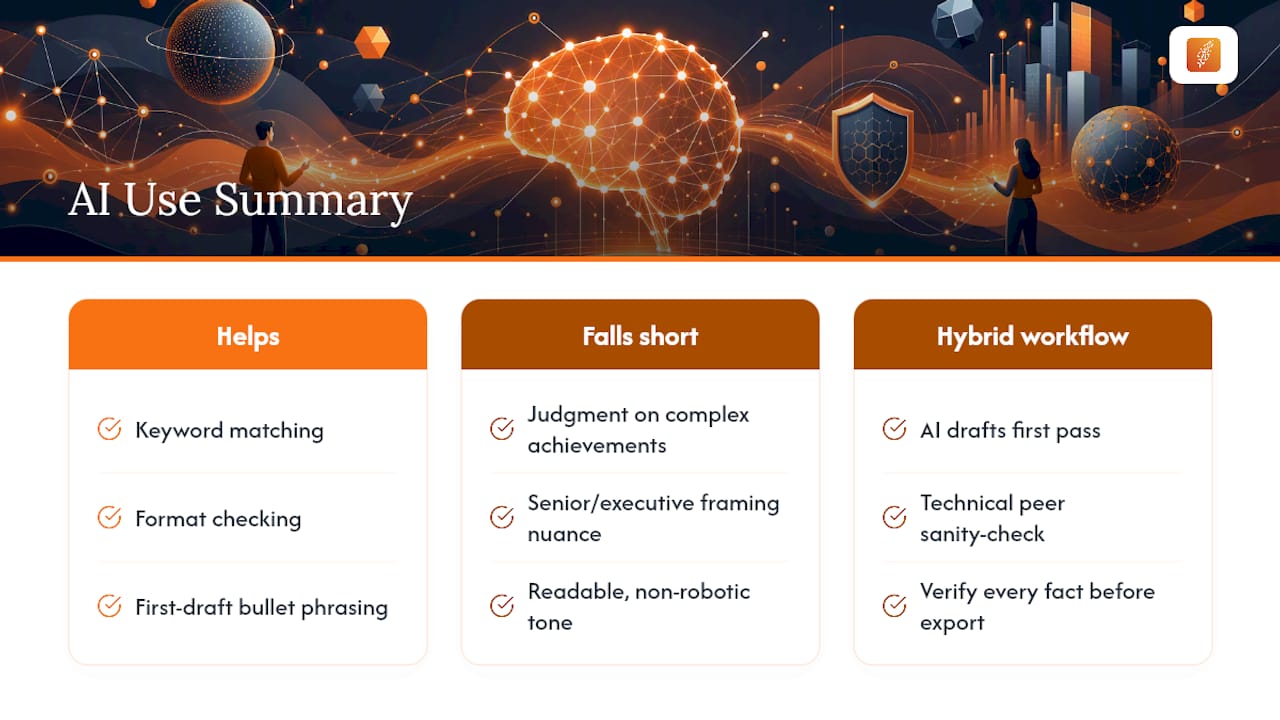
My two cautions: verify every fact an AI tool touches, since these systems will confidently phrase something that isn't quite true if you let them, and resist the urge to over-optimize into keyword soup that reads badly to an actual human reviewer. A resume that scores well but sounds like nobody wrote it will lose you the interview it was supposed to win.
The hybrid workflow I'd recommend: let AI draft the first pass, have a technical peer or mentor sanity-check anything involving scope, scale, or leadership claims, then export. That middle step is the one most job seekers skip.
— Diego
Get Your Resume Optimized With Plucky AI
Most AI resume tools stop at a keyword scan and a template. Plucky AI, Pluckjobs's resume engine, goes further by connecting tailoring directly to real job postings and the hiring managers behind them, so the resume you export isn't just ATS-friendly in the abstract. It's built for the specific role and company you're targeting.
The platform automates the workflow this article just walked through: role-specific bullet tailoring, section-level ATS scoring instead of a single opaque number, and selectable-text PDF exports designed to survive parsing on platforms like Workday and Greenhouse. It's paired with SerpAPI-powered role discovery and hiring manager contact data, which means your optimized resume connects to actual outreach instead of sitting in an application queue.
Pluckjobs runs on a credit-based model with a free trial, so you can test the resume tailoring and ATS scoring before committing to a paid plan. Full pricing details are on the Pluckjobs homepage. If you're ready to tailor your next application, Pluckjobs and run your current resume through it before your next submission.
Sources
- The 6 best AI resume builders in 2026
- How to format your resume for AI screening
- Resume Optimizer (GitHub)
FAQ
Should I use AI to optimize my resume?
Yes, for the mechanical work of keyword matching, formatting checks, and first-pass bullet rewrites. Keep human review in the loop for accuracy and for framing complex or senior-level achievements.
How do I optimize my resume using AI?
Upload a clean, single-column master resume, paste the full job description into an ATS-aware tool, apply the section-level fixes it suggests, verify the parsed output, and export a selectable-text PDF.
Which AI tool is best for resume optimization?
The right tool depends on your field and needs, but look for section-level ATS scoring, verified selectable-text PDF export, and clear data privacy policies rather than a flashy overall score. Pluckjobs's resume tool is built specifically for IT and cybersecurity roles, pairing tailoring with ATS-focused exports and hiring manager outreach data.
What is the 7 second rule in resume?
It refers to the idea that recruiters form an initial impression of a resume in about seven seconds, so your most relevant skills, titles, and achievements need to be visible immediately rather than buried in dense paragraphs. Clear section headings and a keyword-aligned summary near the top help you pass that quick scan.