
TL;DR:
- A job search CRM is a centralized system that tracks applications, recruiter contacts, and communications to enhance job hunting efficiency. It offers visual pipelines, contact management, and AI features, especially benefiting IT and cybersecurity professionals managing complex, multi-stage processes. Using a CRM can reduce workload by up to 70%, improve response rates, and prevent missed deadlines through organized, targeted outreach.
A job search CRM is defined as a specialized system that centralizes your job applications, recruiter contacts, and communications into a single trackable pipeline. The term borrows from sales CRM (Customer Relationship Management) software, where managing relationships and follow-ups drives results. The same logic applies to your job hunt. Tools like Teal, Huntr, and HubSpot have adapted this model for job seekers, while AI-native platforms like TalentClaw and Pluckjobs push it further with automated outreach and role matching. For IT and cybersecurity professionals managing competitive, multi-stage hiring processes, a job search CRM is not optional. It is the difference between a scattered search and a structured campaign.
What is a job search CRM and why does it matter?
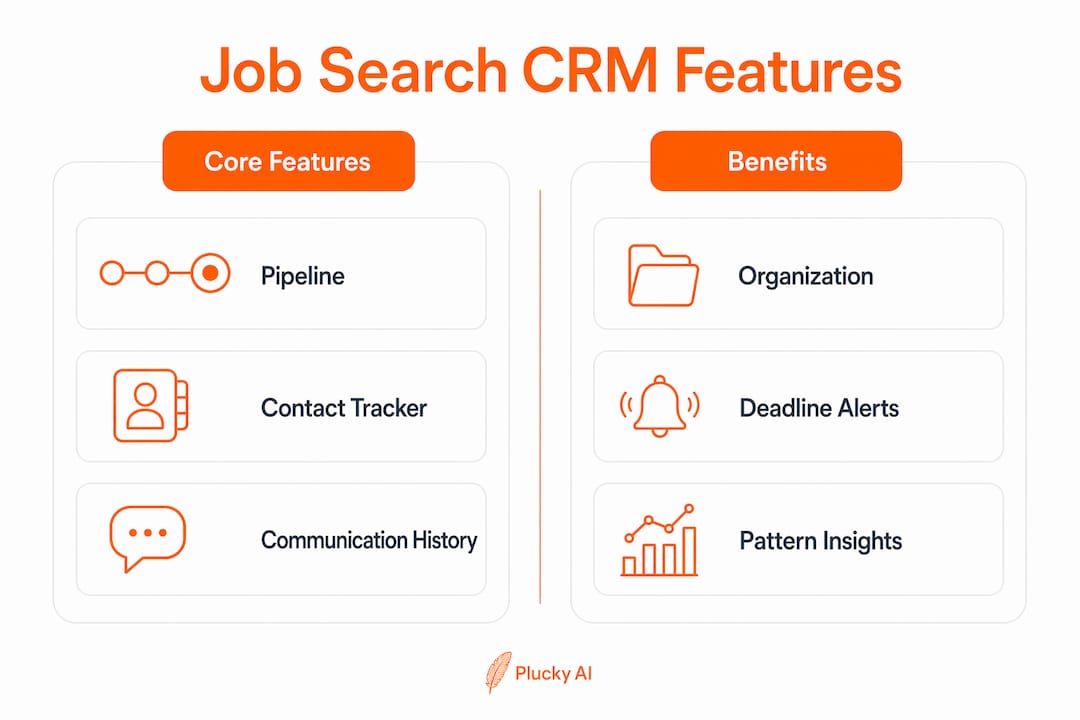
A job search CRM is the personal equivalent of a sales pipeline, built specifically for candidates instead of salespeople. Where a spreadsheet shows you a static list, a CRM shows you a living workflow with stages, contacts, deadlines, and communication history attached to every opportunity.

The core function is organization. HubSpot and similar CRMs organize applications, contacts, and communication history in one place, track email opens, and set interview and follow-up reminders. That means you can see at a glance which roles are stalled, which recruiters need a follow-up, and which interviews are coming up this week.
For IT and cybersecurity professionals, this matters more than in most fields. Security clearance roles, DevSecOps positions, and cloud architecture jobs often involve multiple interview rounds, technical assessments, and panel reviews. Losing track of one deadline in that process can cost you the offer. A CRM eliminates that risk by keeping every detail logged and visible.
The industry term for this category is "personal CRM for job seekers" or "job applicant tracking software" from the candidate side. You will see it called a job search CRM, a job tracker, or a candidate-side ATS. All of these describe the same core tool.
What core features does a job search CRM offer?
The best job search management tools share a common feature set, though the depth of each feature varies significantly by platform.
- Application pipeline tracking: Stages like Applied, Phone Screen, Technical Interview, Offer, and Rejected give you a visual board of your entire search. Tools like Huntr and Teal use Kanban-style boards that mirror how engineering teams track sprints.
- Contact management: Store recruiter names, hiring manager LinkedIn profiles, and internal referrals alongside each application. Huntr and Teal provide personal job search CRMs designed for tracking applications, managing job contacts, and organizing outreach.
- Communication logging: Record every email, LinkedIn message, and phone call. Some platforms track email open rates so you know when a recruiter has read your follow-up.
- Calendar integration: Sync interview times and follow-up reminders directly to Google Calendar or Outlook. Missing a technical screen because of a scheduling gap is avoidable.
- AI-assisted features: TalentClaw builds a rich profile, searches jobs matching your skills, drafts targeted applications, and applies on your behalf with your approval. MR.Jobs adds match scoring and skill overlap analysis for self-hosted users who want full data control.
Pro Tip: Set up your pipeline stages before you apply to a single role. Retrofitting a CRM after 30 applications is painful. Starting clean on day one takes 15 minutes and saves hours later.
The dashboard view is where a job search CRM separates itself from a spreadsheet. Seeing 40 applications color-coded by stage tells you immediately whether you are too concentrated in one company, too slow on follow-ups, or overdue for a networking push. That kind of visibility is impossible with a static Google Sheet.
How do job search CRM tools compare for tech job seekers?
The market for job search software solutions has expanded significantly. Here is how the major options stack up for IT and cybersecurity professionals in 2026.
| Tool | Pipeline View | AI Features | Tech Job Board Integration | Pricing |
|---|---|---|---|---|
| Teal | Visual Kanban | Resume scoring, cover letter drafts | LinkedIn, Indeed | Free tier available |
| Huntr | Visual Kanban | Basic suggestions | Free and paid plans | |
| HubSpot CRM | List and board | Email tracking, sequences | Manual import | Free core CRM |
| TalentClaw | Dashboard | Full AI agent, auto-apply | Multi-source search | Open source |
| MR.Jobs | Local dashboard | Match scoring, form-filling | Multi-source | Self-hosted, free |
| Notion templates | Custom | None native | Manual | Free with Notion |
Teal and Huntr are the most accessible options for job seekers who want a purpose-built tool without technical setup. Both offer visual pipelines and contact management out of the box. Teal adds resume optimization scoring, which is useful when applying to roles with specific keyword requirements like CISSP, SOC 2, or zero-trust architecture.
HubSpot is a full sales CRM repurposed for job searching. It requires more setup but gives you email sequence automation and open-rate tracking that purpose-built job trackers often lack. If you are running a high-volume outreach campaign to hiring managers at cybersecurity firms, HubSpot's contact management depth is hard to match.
TalentClaw and MR.Jobs are built for technically confident users. MR.Jobs is a self-hosted, AI-powered job hunting center that discovers jobs across multiple sources, scores them against your resume, generates tailored applications, and automates form-filling. For a security professional who prefers to keep their job search data off third-party servers, self-hosting is a genuine advantage.
Pro Tip: If you are actively applying to 20 or more roles per month, avoid Notion templates. They require manual maintenance that compounds quickly. Use a purpose-built tool or an AI-native platform instead.
What are the benefits of a job search CRM over spreadsheets?
The case for adopting job applicant tracking software over a spreadsheet comes down to three measurable outcomes: organization, response rates, and time saved.
Using a structured job search CRM can reduce workload by up to 70% by centralizing applications and contacts. Users report managing 50 or more simultaneous applications efficiently and improving response rates up to 3x by shifting from cold applying to targeted outreach. That is not a marginal gain. It is the difference between a two-month search and a six-month one.
Spreadsheets break down at scale. When you are tracking 50 applications across 30 companies, a spreadsheet becomes a liability. You miss follow-up windows. You forget which version of your resume you sent. You lose the name of the recruiter who reached out three weeks ago. A CRM eliminates all of that by attaching every piece of context to the right record automatically.
"The biggest mistake I see IT professionals make is treating their job search like a passive process. A CRM forces you to treat it like a project with owners, deadlines, and metrics."
Job search CRMs reduce the risk of missed deadlines and enable managing complex searches effectively, which is especially critical for IT and cybersecurity roles with competitive multi-stage processes. Organizing contacts and automating communication helps sustain networking efforts over months, not just weeks.
The cognitive load reduction is real too. Knowing that every application, contact, and follow-up is logged removes the mental overhead of trying to remember where things stand. That clarity directly reduces job search fatigue, which is one of the primary reasons candidates disengage from a search before landing the right role.
How to use a job CRM effectively in your IT job search
Setting up a job search CRM correctly from the start determines how useful it becomes over time. Follow this workflow to get full value from the tool.
- Build your profile first. Enter your current resume, key skills (cloud security, penetration testing, SIEM tools, etc.), and target role types before adding any applications. AI-enabled platforms use this data to score matches and draft outreach.
- Create your pipeline stages. Use stages that reflect your actual process: Researching, Applied, Recruiter Screen, Technical Round, Final Interview, Offer, Rejected. Customize these to match the hiring patterns in cybersecurity and IT.
- Import or log every active application. Add every role you have applied to in the last 30 days. Include the job description URL, the date applied, and the contact name if you have one.
- Connect your job boards. LinkedIn alone is insufficient for comprehensive IT job search management. Link your CRM to additional sources like Dice, CyberSecJobs, and niche tech boards to capture all activity in one place.
- Set follow-up reminders. CRMs with reminders and communication logs improve follow-up timing and candidate responsiveness significantly. Schedule a follow-up for every application at the 7-day mark if you have not heard back.
- Log every interaction. Every recruiter call, LinkedIn reply, and email exchange goes into the contact record. This history becomes critical when you re-engage a contact months later.
- Review your pipeline weekly. Spend 20 minutes every Friday analyzing your data. Which stages have the most stalled applications? Which companies have gone silent? Use this to track job search metrics and adjust your outreach strategy.
Pro Tip: Use your CRM data to identify patterns. If you consistently get recruiter screens but stall at the technical round, that is a skills gap signal, not a volume problem. A CRM makes that diagnosis possible.
Key takeaways
A job search CRM is the single most effective tool for IT and cybersecurity professionals managing complex, multi-stage hiring processes at scale.
| Point | Details |
|---|---|
| Core definition | A job search CRM centralizes applications, contacts, and communications into one trackable pipeline. |
| Top tools for tech pros | Teal, Huntr, HubSpot, TalentClaw, and MR.Jobs each serve different levels of technical need and search volume. |
| Measurable efficiency gain | Structured CRM use can reduce job search workload by up to 70% and improve response rates up to 3x. |
| Setup priority | Build your profile and pipeline stages before logging applications to get full value from AI features. |
| Beyond LinkedIn | Integrating a CRM with multiple job boards and contact sources is required for a complete IT job search. |
Why most IT professionals are using crms wrong
I have watched technically sharp professionals treat their job search CRM like a filing cabinet. They log applications, update stages occasionally, and then wonder why the tool is not delivering results. The problem is not the tool. It is the workflow.
A CRM only works if you treat your job search like a sales campaign. That means setting weekly outreach targets, reviewing your pipeline data every Friday, and using communication logs to time follow-ups with precision. The professionals I have seen land roles fastest are the ones who use their CRM to build relationships with tech recruiters, not just track applications.
The other mistake is over-automating too early. AI features like auto-apply and bulk outreach are powerful, but they backfire when your profile is not dialed in. Spend the first week getting your target roles, skills, and resume data right inside the CRM. Then let the automation run. Rushing to automation with a weak profile produces high volume and low response rates.
The future of job search CRMs is moving toward full AI agents that handle discovery, application drafting, and follow-up sequences autonomously. TalentClaw and Pluckjobs are already operating in that direction. But the professionals who will get the most from those tools are the ones who understand the underlying workflow first. Technology amplifies good process. It does not replace it.
— Diego
Find your next IT role faster with Pluckjobs
Managing a cybersecurity or IT job search across dozens of applications, contacts, and follow-ups is exactly the problem Pluckjobs was built to solve.
Pluckjobs combines Apollo contact intelligence with SerpAPI-powered role discovery to deliver precision job matches, hiring manager outreach data, and tailored resumes in one platform. You get AI-generated applications matched to your skills, direct contact data for hiring managers, and a centralized pipeline that replaces the spreadsheet entirely. No cold applying. No lost follow-ups. Just a structured, data-driven search built for IT and cybersecurity professionals who want to move fast and land right.
FAQ
What is a job search CRM in simple terms?
A job search CRM is a tool that organizes your job applications, recruiter contacts, and follow-up tasks in one place. It works like a sales pipeline but for candidates instead of salespeople.
How is a job search CRM different from an ATS?
An ATS (Applicant Tracking System) is used by employers to screen candidates. A job search CRM is used by the candidate to manage their own search, contacts, and communications from the applicant side.
What are the best CRM tools for IT job seekers in 2026?
Teal and Huntr are the most accessible purpose-built options. TalentClaw and MR.Jobs offer AI-powered automation for technically confident users. Pluckjobs adds contact intelligence and role discovery specifically for IT and cybersecurity professionals.
Can a job search CRM improve my response rate?
Yes. Users report response rates up to 3x higher when shifting from cold applying to targeted, CRM-managed outreach with timed follow-ups and personalized messaging.
Do i need technical skills to use a job search CRM?
Most tools like Teal and Huntr require no technical setup. Self-hosted options like MR.Jobs require basic server knowledge but give you full data control, which is a priority for many security professionals.