
The fastest way to land an IT or cybersecurity role is a discovery workflow that runs in five stages: discover, match, validate, outreach, track. Skip a stage and you get what most job seekers get: generic applications into a black hole.
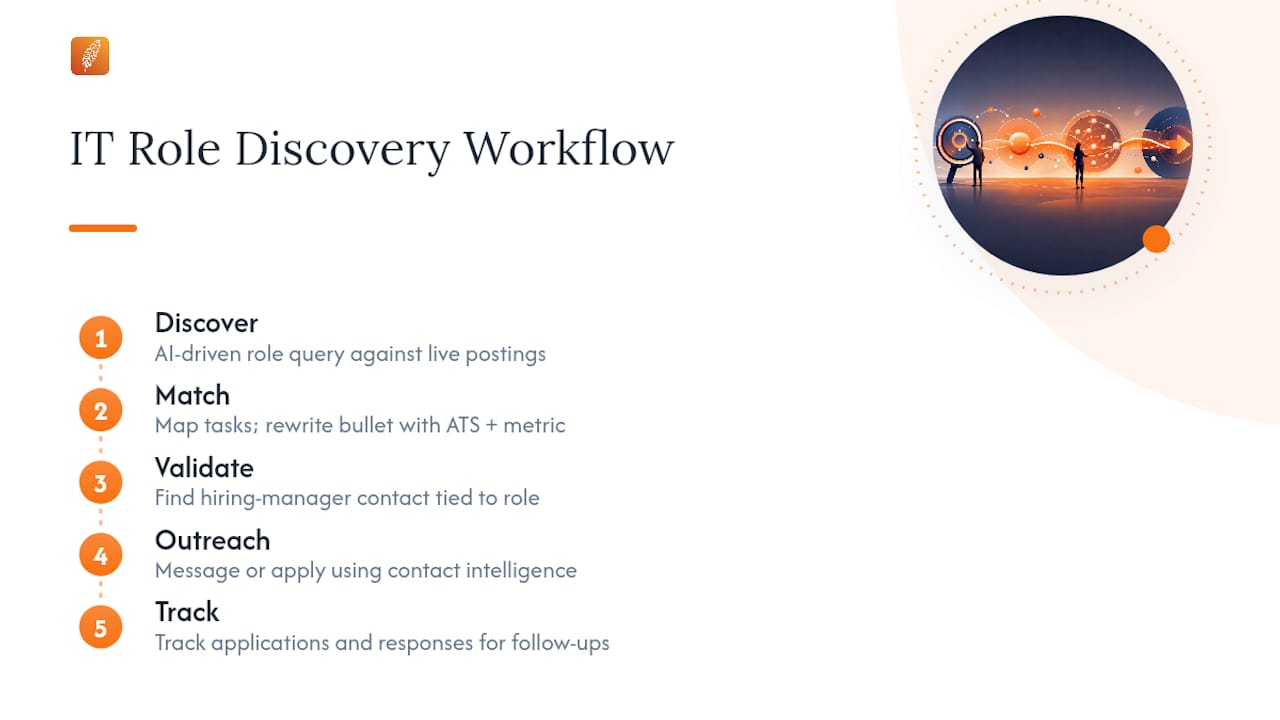
In the next 48 hours, you can run one AI-driven role discovery query against live postings, rewrite one resume bullet with ATS-safe keywords and a real metric, and identify one hiring manager contact tied to a role you actually want. That's the entire loop, compressed.
Three components make this work. Task-level taxonomies (the kind MITRE ATT&CK uses for security skills) beat title matching. Role-discovery signal sources like SerpAPI surface postings before they go stale. And integrated platforms like Pluckjobs.io pair that discovery data with hiring-manager contact intelligence so you're not applying blind.
Key Takeaways
Effective IT role discovery combines task-level matching, ATS-safe resume engineering, and validated hiring-manager outreach into one trackable, repeatable cycle.
| Point | Details |
|---|---|
| Match on tasks, not titles | Job titles hide up to 20 different role profiles, so evaluate responsibility language before applying. |
| Validate before outreach | Cross-check AI-suggested matches against company career pages and public project evidence to catch stale or hallucinated listings. |
| Keep resumes ATS-clean | Use single-column formatting, exact certification tokens, and metric-driven bullets, then sanitize for hidden Unicode artifacts. |
| Outreach short and personalized | Send 50 to 125 word emails referencing a specific team or project, and follow up with new information rather than a generic nudge. |
| Use an integrated platform | Pluckjobs.io pairs SerpAPI role discovery with Apollo contact data and ATS-aligned resume tools in one workflow. |
Table of Contents
- What Is AI-Driven IT Role Discovery?
- What Signals Make Role Discovery Accurate?
- How Do You Run the Discover to Track Workflow?
- How Do You Align a Resume With ATS Filters?
- How Do You Find and Contact a Hiring Manager?
- Which Tools Combine Discovery With Outreach Data?
- How Should You Manage Job Search Data and Privacy?
- Try Plucky AI for Faster Role Matches
- Sources
- FAQ
What Is AI-Driven IT Role Discovery?
AI-driven role discovery means using automated tools to scan job postings, extract task-level requirements, and match them against your actual skills and experience, then layering in hiring-manager contact data so you can reach a real person instead of a portal. It is distinct from IT infrastructure or identity-access-management "role discovery," which finds network assets or permission structures. This article covers only the candidate-facing kind—that is, matching people to open positions.
Done well, this process delivers three outcomes:
- Higher match precision, meaning the roles you pursue actually reflect your skill set rather than a shared job title.
- A resume that survives applicant tracking system parsing without losing the human read.
- Outreach that reaches an actual hiring manager, not a recruiting inbox that never opens.
The gap between a good role-discovery workflow and a mediocre one usually isn't the AI model. It's whether you validate what the model gives you before you act on it.
What Signals Make Role Discovery Accurate?
Role discovery lives or dies on input quality. The signals that matter, ranked roughly by how much they improve match precision:
- Job-post text, parsed for requirements versus responsibilities. Requirements tell you the filter; responsibilities tell you the actual job.
- Skills and ontologies, including frameworks like MITRE ATT&CK for security roles or cloud-provider certification tiers for infrastructure roles.
- Seniority indicators, such as scope language ("owns," "leads," "supports") rather than years-of-experience claims alone.
- Hiring velocity and market demand, which tells you whether a posting reflects urgent need or is sitting stale.
- Hiring-manager contact intelligence, sourced through tools like Apollo, which tells you whether a real decision-maker is reachable at all.
Job titles alone hide enormous variance. A "Security Engineer" posting at one company can describe pure detection engineering; at another, it's compliance paperwork with a security label attached. Industry analysis on hiring failures points out that job titles alone can hide 10 to 20 different role profiles, which is exactly why task-level matching outperforms title-level searches.
Weight your signals accordingly: task-match evidence should outrank keyword frequency, and hiring-manager presence should outrank posting freshness alone.
Pro Tip: Ignore postings that stack "nice-to-have" tools in the same bullet format as core responsibilities. If a listing gives equal visual weight to Kubernetes experience and a required certification, the job description itself is poorly scoped, and your match confidence should drop accordingly.
How Do You Run the Discover to Track Workflow?
Run this cycle per target role. Most cycles complete in 48 to 72 hours from discovery to first outreach message.
- Discover. Build a query that combines task-level language ("threat hunting," "IAM provisioning"), specific technologies, and a seniority marker. Avoid vague title-only searches.
- Match. Score the AI-suggested match against three checks: does the responsibility language match your actual work history verb-for-verb, does the tech stack overlap by more than half, and does the seniority language fit your level.
- Validate. Cross-check the posting against the company's own careers page, recent team hiring patterns, or public project evidence like GitHub activity. This step catches AI hallucination and stale or duplicated listings before you invest time.
- Outreach. Identify the hiring manager, not a generic recruiter, and send a short, tailored message within a day of validating the role.
- Track. Log match precision, ATS pass-rate, outreach reply rate, and time-to-screen for every role you pursue.
Build a discard checklist before you get emotionally attached to a posting:
- Core responsibility verbs don't match your actual experience.
- The tech stack is internally inconsistent (a "cloud-native" role requiring a decade of on-prem-only tools).
- No hiring-manager contact exists anywhere, including LinkedIn or the company site.
- The listing has sat unfilled for well over 30 days with no recruiter activity.
If a role fails two or more of these checks, move on. Chasing a bad match wastes the same 48 to 72 hours you'd spend on a good one.
How Do You Align a Resume With ATS Filters?
ATS parsers read your resume as structured text, not as a design object. Columns, text boxes, and embedded images routinely get scrambled or dropped entirely. Stick to a single-column layout, standard fonts, and a .docx or plain PDF export, in that order of parser reliability.
Keyword strategy matters more than most candidates realize, but it has to be honest. Pull the exact phrasing from the job description, prioritize task verbs and named technologies over soft skills, and place them inside experience bullets that carry a real metric.
Keep a dedicated technical skills section listing certification tokens exactly as issuers write them: CISSP, CCSP, not spelled-out variants an ATS might not recognize. Then sanitize the file. AI resume tools can leave behind hidden Unicode characters or formatting artifacts that break parsers entirely, and industry guidance on ATS resume engineering recommends checking for exactly these issues before submission. Robert Half's own guidance on AI job-search tools makes the same point from the hiring side: hiring managers increasingly check AI-generated materials for hallucinated claims, so treat any AI draft as a first pass, not a final one.
Pro Tip: Run your resume through an ATS simulator, then do a manual scan by copying the text into a plain text editor. If anything looks garbled, malformed, or duplicated, an ATS is seeing the same mess you are.
Our guide on core competencies for IT and cybersecurity resumes walks through certification formatting and skills-section structure in more depth.
How Do You Find and Contact a Hiring Manager?
Skip the portal. Direct outreach to a hiring manager consistently outperforms application-only submissions because it bypasses the queue entirely. Start with LinkedIn's people filter using the company name and a title guess ("Engineering Manager," "Director of Security"), then check the company's own "People" or "Team" page, and look for team names mentioned in the posting itself as a clue to org structure.
Once you have a name, verify the email pattern (most companies use a consistent format like first.last@domain) and run it through a verification tool before sending, since bounced emails hurt your sender reputation for future outreach.
Keep the message short: 50 to 125 words, one clear value statement, and a single low-friction ask, like a 15-minute call rather than "let's connect." Research on cold outreach to hiring managers confirms that a short, personalized email at this length outperforms longer generic templates, and referencing something specific about the team or a recent project raises reply rates further than a generic pitch ever will.
Watch for red flags before you invest outreach time:
- The posting date is more than 30 days old with no visible recruiter activity.
- The listed responsibilities don't match anything on the company's actual careers page.
- No hiring-manager signal exists anywhere, suggesting a ghost listing built for pipeline data.
Two reliable follow-up triggers if your first message goes unanswered: a company product announcement, or evidence of a completed project relevant to the role. Both give you new information to reference, which our guide on common IT job search mistakes flags as one of the biggest gaps in candidate follow-up.
Which Tools Combine Discovery With Outreach Data?
Five tool categories cover the full workflow: role-discovery APIs (SerpAPI-style signal aggregation), contact intelligence platforms (Apollo), ATS simulators for resume testing, private or local AI models for sensitive resume editing, and a tracking system for outreach cadence.
Run them separately and you'll spend more time moving data between tools than actually applying. An integrated platform closes that gap: role data flows straight into an ATS-tuned resume generator, contact enrichment auto-populates your outreach template, and match precision gets logged automatically instead of in a spreadsheet you'll abandon by week two.
When evaluating any tool in this category, prioritize:
- Match-precision scoring you can actually see, not a black-box "fit score."
- ATS-alignment suggestions tied to the specific posting, not generic keyword lists.
- Contact quality, meaning verified emails, not guessed patterns.
- Privacy controls over what gets shared with third-party APIs.
Pluckjobs.io builds around exactly this integration, combining SerpAPI-powered role discovery with Apollo contact enrichment inside one credit-based workflow, which is the pattern this entire article recommends running.
How Should You Manage Job Search Data and Privacy?
Treat your job search data the way you'd treat any sensitive project: minimize what you share with public APIs, and prefer tools offering enterprise-grade isolation for anything containing personal identifying information. Guidance on AI resume tools consistently recommends local or private models over public cloud APIs specifically because sensitive application artifacts, references, and salary history shouldn't sit in a general-purpose model's training pipeline.
Track five metrics consistently: ATS pass-rate, match precision from a manual sample review, outreach reply rate, time-to-screen, and your false-positive match rate (roles that looked promising but failed validation). Without these numbers, you're guessing at what's actually working.
Keep application artifacts in encrypted storage with a simple naming convention per role, and don't rely on memory for which version of your resume went where. One brief note on compliance: individual company privacy policies govern how your data gets used once submitted, and this article isn't a substitute for reading them.
Our breakdown of how IT professionals manage job search data covers the tracking template side of this in more detail.
How We Run This at Scale
We build consistent query templates for every role category, then run every AI match through a human validation step before it reaches outreach. That combination, not the AI alone, is what produces cleaner match precision. In practice, roles that pass validation see meaningfully better outreach reply rates than unfiltered lists. If you take one thing from this: validate before you outreach.

Try Plucky AI for Faster Role Matches
Plucky AI runs the entire workflow described above inside one platform, so you're not stitching together a role-discovery tool, a resume editor, and a contact database separately. It pairs SerpAPI-powered role discovery with Apollo contact enrichment, which means match suggestions arrive with a real hiring-manager contact attached, not just a job description.
Three capabilities most job seekers ask for once they see this workflow in action:
- Match-precision scoring on every suggested role, so you know which ones are worth your time before you apply.
- An ATS-aligned resume builder that adjusts keywords and formatting per posting.
- Outreach templates with contact enrichment already attached, cutting the manual research step entirely.
If you're ready to stop applying blind, start a free trial with Plucky AI and run your first role-discovery query today.
Sources
- AI can’t fix cybersecurity hiring until companies fix their job descriptions — CYBR.SEC.MEDIA
- From ATS Graveyard To Interview Stage: The Cybersecurity Professional’s Guide To AI-Powered Resume Engineering + Video — Undercode Testing
- How to Find and Email Hiring Managers Directly — Whali
FAQ
What Are IT Role Discovery Best Practices?
The core best practices are matching on task-level responsibilities rather than job titles, validating AI-suggested roles against real company signals, and pairing outreach with sanitized, ATS-aligned resumes.
How Long Does a Role Discovery Cycle Take?
A full cycle from discovery through first outreach typically runs 48 to 72 hours per target role when using structured queries and pre-verified contact data.
Can AI Accurately Match Me to the Right IT Role?
AI narrows the field effectively but requires human validation, since job postings themselves often misrepresent the actual work, and title-only matching hides significant role variance.
What Should I Check Before Submitting an ATS Resume?
Confirm single-column formatting, accurate certification tokens, metric-driven bullets, and scan for hidden Unicode or formatting artifacts that AI tools sometimes leave behind.
Does Pluckjobs Help With Hiring Manager Outreach?
Yes. Pluckjobs.io combines Apollo contact enrichment with SerpAPI role discovery so outreach templates arrive with a verified hiring-manager contact already attached.