
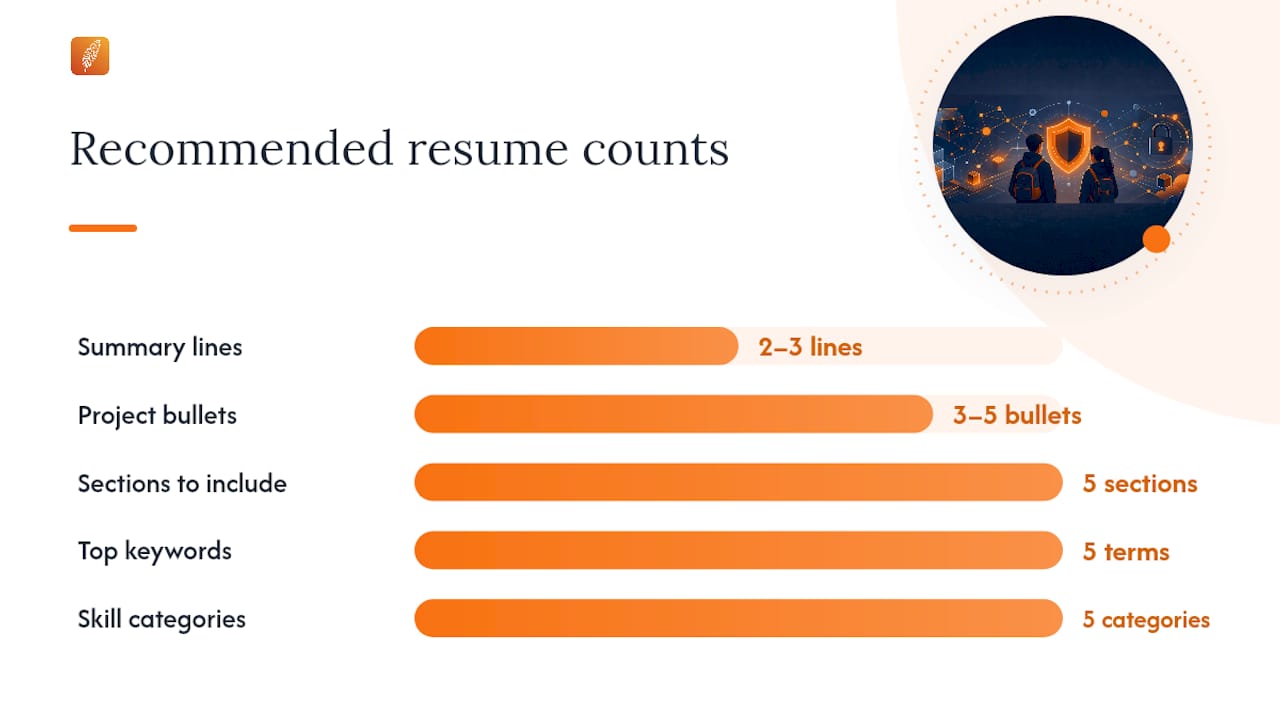
Your entry-level IT or cybersecurity resume needs one thing above everything else: proof you can handle day-one tasks. Lead with a 2–3 line capability summary that names your target role, your top technical skills, and one measurable project or lab outcome. Then back it with three achievement-style bullets or project entries that show applied ability, not just tool familiarity. According to ISC2 hiring research, hiring managers at the entry level prioritize trainability, problem-solving, and communication alongside technical basics. They are not expecting five years of experience. They are expecting evidence you can learn fast and contribute quickly.
Your one-page resume must include:
- Contact block: Full name, city and state, U.S. phone, professional email, LinkedIn, GitHub
- Professional summary: 2–3 lines, target role + core skills + one quantified outcome
- Technical skills matrix: Grouped by category (Languages, Tools, Systems, Networking, Security)
- Projects or experience: 3–5 STAR-style bullets framed around real outcomes
- Education and certifications: With issuer, credential name, and date earned or "in progress"
Pro Tip: Run a keyword search on your saved resume file (Ctrl+F or Cmd+F) for the top 5 terms from the job description. If any are missing, add them before you submit.
Key Takeaways
An ATS-optimized, one-page resume with a targeted summary, grouped skills, and three project-based proof bullets is the fastest path from application to interview for entry-level IT and cybersecurity candidates.
| Point | Details |
|---|---|
| Lead with your summary | Write 2–3 lines naming your target role, top skills, and one measurable project outcome. |
| Prioritize projects over thin experience | Place Projects above Experience when formal work history is limited. |
| Tailor every submission | Extract 8–12 keywords per job description and mirror them in your summary and top bullets. |
| ATS formatting is non-negotiable | Use standard headers, body-only contact info, and include both acronym and full-phrase variants for key terms. |
| Pluckjobs accelerates the process | Plucky AI rewrites and keyword-aligns your resume per job posting and provides hiring manager outreach data. |
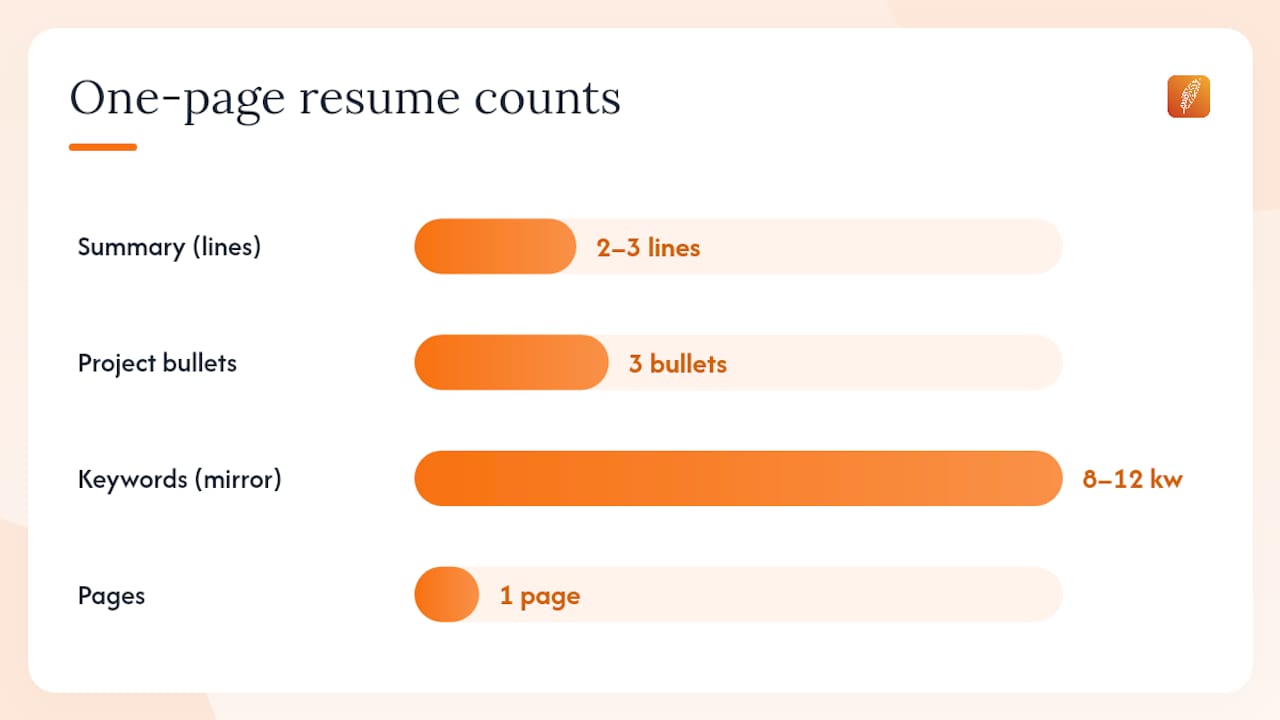
Table of Contents
- What does a one-page IT resume layout actually look like?
- What contact information and links should you include?
- How do you write a professional summary for a cybersecurity role?
- How should you list and group technical skills?
- How do you write experience bullets that prove you are ready?
- How do you present technical projects as real work experience?
- How should you present education and certifications?
- What is the right ATS optimization workflow for each application?
- What formatting rules keep your resume ATS-friendly and readable?
- What should you do if you have little or no formal work experience?
- Pre-send checklist: 10 checks before you submit
- What hiring managers actually want from entry-level candidates
- Plucky AI helps you tailor and submit faster
- Sources
- FAQ
What does a one-page IT resume layout actually look like?
Hiring managers scanning junior resumes spend seconds on the first half of the page before deciding whether to read further.
Recommended section order for entry-level candidates:
- Name, contact info, and clickable links (top of page, not in a header)
- Professional summary (2–3 lines)
- Technical skills matrix (grouped by category)
- Projects (above Experience when you have more projects than jobs)
- Education and certifications
- Work experience (if any)
Cornell Career advises entry-level candidates to keep the resume to one page and prioritize projects and GitHub links when formal experience is limited. Swapping Projects above Experience is not a workaround. For early-career IT candidates, it is the correct structure.
Pro Tip: Print a PDF of your resume and fold it in half. Everything above the fold should show your target role, core skills, and at least two proof points. If it does not, reorder.
What contact information and links should you include?
Keep your contact block clean and ATS-readable. Place it in the main body of the document, never inside a header or footer, because ATS platforms often skip header content entirely.
Required fields:
- Full legal name (larger font, top of page)
- City and state only (no full street address)
- U.S. phone number
- Professional email (first-name.last name format)
Clickable links to include:
- LinkedIn profile URL (customize it: linkedin.com/in/yourname)
- GitHub profile with curated, pinned repositories
- Portfolio or live demo link if available
Pro Tip: Before submitting, click every link in your resume PDF. A broken GitHub link is one of the most common reasons a hiring manager stops reading.
Do not include personal social media handles unrelated to tech. Check that your GitHub username and LinkedIn headline match the role you are targeting on the resume.
How do you write a professional summary for a cybersecurity role?
Your summary is a 2–3 line capability statement. It functions as both an ATS keyword target and a human elevator pitch. Structure it as: target role + 2–3 core technical keywords + one quantified project or lab outcome.
Strong examples:
What to avoid:
- Generic objectives ("Seeking a challenging position where I can grow")
- Mismatched job titles (write "SOC Analyst" if the posting says "SOC Analyst," not "Security Analyst")
- Listing tools without context or outcomes
UMGC Career Connection confirms that a concise summary paired with grouped skills and quantified bullets is what separates strong technology resumes from weak ones.
Pro Tip: Copy the exact job title from the posting into your summary. ATS systems match strings literally, and "Cybersecurity Analyst" and "Security Analyst" are not the same token.
How should you list and group technical skills?
A categorized skills matrix helps both ATS parsers and hiring managers assess your tooling fit in under ten seconds. Group skills by type and place the most relevant category first for each application.
Recommended categories and sample entries:
- Languages: Python, Bash, PowerShell, SQL
- Tools/Platforms: Splunk, Wireshark, Nmap, Metasploit, Burp Suite
- Systems: Linux (Kali, Ubuntu), Windows Server, VMware
- Networking: TCP/IP, DNS, DHCP, VLANs, pfSense
- Security: SIEM, vulnerability scanning, incident response, NIST CSF, MITRE ATT&CK
Surface your skills in two places: the skills matrix and inside your experience or project bullets. ATS platforms score higher when a keyword appears in context, not just in a list.
Pro Tip: Include both the acronym and the full phrase for critical terms. Write "SIEM (security information and event management)" once in your skills section so both variants parse correctly.
How do you write experience bullets that prove you are ready?
Junior cybersecurity resumes fail ATS checks most often because they list tools without context or describe duties instead of outcomes. The fix is a compact bullet formula: Action verb + Tool or context + Measurable outcome.
Weak to strong rewrites:
- Weak: "Used Wireshark to look at network traffic." Strong: "Captured and analyzed 500+ packets in Wireshark to identify ARP spoofing patterns in a lab environment."
- Weak: "Helped with vulnerability scanning." Strong: "Ran Nmap scans across a 20-host lab network, documented open ports, and produced a remediation report."
- Weak: "Learned Python scripting." Strong: "Wrote a Python script to automate log parsing, cutting manual review time by 30% in a simulated SOC workflow."
Strong action verbs for IT/cybersecurity bullets:
- Detected, analyzed, remediated, configured, deployed, automated, monitored, documented, triaged, audited, scripted, hardened
Use numbers whenever you can support them. Lab environments, CTF scores, script line counts, and time-saved estimates all count. Demonstrating day-one operational tasks through bullets and projects is what signals operational readiness to a hiring manager.
Pro Tip: If you cannot attach a number, attach a scope. "Across a 10-host lab" is more credible than "in a lab environment."
How do you present technical projects as real work experience?
Projects, CTFs, and home labs are legitimate evidence of ability when formatted correctly. Use this template for each entry:
Project entry template: Problem you solved → Your role and actions → Tools used → Measurable result or learning → Link to repo or write-up
Three formatted examples:
- Home SOC Lab: Deployed a Splunk SIEM on a home network to ingest Windows Event Logs and Syslog data; wrote detection rules for failed login attempts and lateral movement indicators. [github.com/yourname/soc-lab]
- CTF Challenge (TryHackMe): Completed 15 rooms in the SOC Level 1 path, detecting and remediating simulated threats including phishing, malware persistence, and privilege escalation. [tryhackme.com/p/yourname]
- Log Automation Script: Built a Python script to parse Apache access logs and flag anomalous IP patterns; reduced manual triage time by an estimated 25 minutes per shift in a test environment.
For GitHub repos, write a clear README with three sections: "What I built," "My role," and "How to run it." A hiring manager who clicks your link and finds a blank repo loses confidence immediately.
Pro Tip: Pin your three strongest repos on GitHub before you apply. Hiring managers who click your profile see pinned repos first.
How should you present education and certifications?
For entry-level candidates, certifications belong above work experience. List issuer, credential name, and month and year earned or "In Progress."
Relevant certifications for early-career IT/cybersecurity:
- CompTIA Security+ (most requested entry-level security cert)
- CompTIA A+ or Network+ (IT support and networking foundation)
- Google Cybersecurity Certificate (Coursera, widely recognized)
- AWS Cloud Practitioner or Microsoft AZ-900 (cloud fundamentals)
- ISC2 Certified in Cybersecurity (CC) (free entry-level cert)
How to present ongoing coursework:
- "TryHackMe SOC Level 1 Path — In Progress (expected completion: March 2026)"
- "Google Cybersecurity Certificate — Coursera, completed January 2026"
Never imply a credential you have not earned. "In Progress" is honest and still signals commitment. Include a verification link (Credly badge URL or Coursera certificate link) where possible.
Pro Tip: If you have a CompTIA cert, add the verification code and the Credly badge URL. Hiring managers verify certs, and making it easy builds trust.
What is the right ATS optimization workflow for each application?
ATS platforms parse resumes literally. Formatting errors and missing keywords cause rejections before a human ever reads your resume.
ATS checklist before every submission:
- Save as .docx for most ATS platforms; use PDF only when the posting explicitly requests it.
- Name the file: FirstName-LastName-RoleTitle-Resume.docx
- Use standard section headers: "Experience," "Education," "Skills" (not "My Toolkit" or "What I Know")
- Place contact info in the body, not in a header or footer
- Use a standard sans-serif font (Calibri, Arial, or Helvetica) at 10–12pt
- Include both acronym and full-phrase variants for key terms
Tailoring workflow (per application):
- Read the job description and extract 8–12 keywords
- Check which keywords appear in your summary, skills matrix, and top three bullets
- Reorder your skills categories to lead with the most relevant group
- Adjust your summary to mirror the exact job title and top two skill requirements
- Swap in the most relevant project as your first project entry
Customizing your resume per job posting is the single highest-leverage action you can take before submitting.
Pro Tip: Paste your resume text and the job description into a keyword comparison tool. Any term that appears three or more times in the posting but zero times in your resume is a gap to fix.
What formatting rules keep your resume ATS-friendly and readable?
One page. No exceptions for entry-level candidates. Entry-level resumes should stay focused and compact, and padding a second page with thin content signals inexperience, not depth.
Formatting rules:
- Font: Calibri, Arial, or Helvetica at 10–12pt body, 14–16pt name
- Margins: 0.5–1 inch on all sides
- Bullets: consistent style throughout (solid circle or dash, never mixed)
- No images, logos, or graphics in the body
- No tables in the main content (ATS parsers misread table cells)
- No color beyond a single subtle accent on your name or section headers
Common mistakes to fix before sending: mismatched dates between resume and LinkedIn, broken GitHub links, repo names that do not match the project descriptions on the resume, and inconsistent capitalization of tool names (Splunk vs. splunk).
Pro Tip: Convert your resume to plain text (paste into Notepad). If it reads logically in plain text, it will parse correctly in most ATS platforms.
What should you do if you have little or no formal work experience?
Reorder your resume so Projects, Certifications, and Skills appear before Experience. Three strong project bullets outperform a thin work history every time.
Content reordering for zero-experience candidates:
- Contact block
- Professional summary
- Certifications
- Technical skills matrix
- Projects (3 entries minimum)
- Education
- Work experience (part-time, volunteer, or informal)
Project-to-experience conversion examples:
- Home lab → "Managed a SIEM data feed ingesting 10,000+ daily log events; wrote correlation rules to flag brute-force login attempts"
- CTF challenge → "Detected and remediated simulated threats including SQL injection, XSS, and privilege escalation across 15 TryHackMe rooms"
- Volunteer IT support → "Provided desktop support and network troubleshooting for a 30-user nonprofit office; resolved 95% of tickets within 24 hours"
For informal internships or unpaid volunteer work, use a standard role title, include dates, and write outcome-focused bullets. "Volunteer IT Support Technician | Local Nonprofit | June–August 2025" is a legitimate resume entry when backed by real outcomes.
Pre-send checklist: 10 checks before you submit
- Summary matches the exact job title in the posting
- Top 3 keywords from the job description appear in your summary and first bullet
- Three proof points are visible above the fold
- All links (LinkedIn, GitHub, portfolio) open correctly
- File named FirstName-LastName-RoleTitle-Resume.docx
- Certifications include issuer, date, and verification link
- Skills matrix leads with the most relevant category for this role
- No headers or footers contain contact information
- Resume fits one page with no font below 10pt
- Spell-check and read aloud for grammar errors
If you have under 10 minutes before a deadline, prioritize in this order: keyword match in summary, working links, correct file name, one-page rule.
Pro Tip: Make a master resume with everything, then save a job-specific copy for each application. Never submit the master version directly.
What hiring managers actually want from entry-level candidates
The conventional wisdom says certifications are the ticket into cybersecurity. The reality is more nuanced. ISC2's hiring research shows that hiring managers consistently value trainability, communication, and problem-solving alongside technical basics. Many organizations actively invest in developing junior staff rather than waiting for fully formed candidates.
What that means for your resume: curiosity and demonstrated learning matter. A candidate who built a home SOC lab, documented the process on GitHub, and can explain what they learned in a bullet point is more compelling than one who lists 20 tools with no context. The resume is not a skills inventory. It is a proof document.
From the Pluckjobs perspective, the most common early-career mistake is treating the resume as a static document. The candidates who get interviews submit tailored versions, not the same file to 50 postings. Hiring managers notice when a summary is generic. They also notice when it is specific. That specificity is what gets a callback.
Plucky AI helps you tailor and submit faster
Pluckjobs built Plucky AI specifically for IT and cybersecurity job seekers who need more than a generic resume template. Plucky AI rewrites your summary and bullets to match each job description, aligns your skills matrix with ATS keyword requirements, and surfaces hiring manager contact data so you can follow up directly.
The difference between a resume that clears ATS and one that does not often comes down to keyword placement and bullet structure. Plucky AI handles both automatically, then gives you verified outreach contacts so your application does not disappear into a black hole. Start your first resume rewrite at Pluckjobs and test it against a real job description before you submit.
Sources
- Why these essential elements create a strong technology resume | UMGC Career Connection
- Entry-level software engineer resume: what recruiters want to see | Cornell Career
- ISC2 Hiring and Retaining Top Cybersecurity Talent
- Cybersecurity Resume Guide 2026 | Unihackers
- True Confessions of a Cybersecurity Manager Reviewing Entry-Level Resumes | Jamie Dicken (Medium)
FAQ
How long should a teenager's IT resume be?
One page. Entry-level candidates with limited formal experience should keep the resume to one page and fill it with projects, certifications, and achievement-style bullets rather than padding it with thin job descriptions.
What if I have no work experience at all?
Reorder your resume to lead with Projects, Certifications, and Skills. Three well-written project bullets from a home lab, CTF, or volunteer tech role demonstrate more readiness than an empty Experience section.
How do I make my resume pass ATS filters?
Use standard section headers, place contact info in the body (not headers or footers), save as .docx unless the posting specifies PDF, and include both the acronym and full phrase for key terms like "SIEM (security information and event management)."
Which certifications matter most for entry-level cybersecurity?
CompTIA Security+ is the most widely requested entry-level security certification. ISC2's Certified in Cybersecurity (CC) is free and a strong complement. Google's Cybersecurity Certificate on Coursera is broadly recognized for candidates without a degree.
Can Pluckjobs help me tailor my resume for each application?
Yes. Plucky AI rewrites your summary and bullets to match each job description, aligns your skills matrix with ATS keyword requirements, and provides hiring manager contact data for direct outreach.