
If you want to find entry-level IT jobs fast, target three titles: help desk technician, IT support specialist, and junior network technician, and search them today on Indeed and Handshake. Those two platforms surface the highest volume of beginner-friendly postings, and most listings accept certification in place of a degree.
Here's what to do in the next 72 hours:
- Rewrite two resume bullets around a real project or volunteer task (a home lab, a helpdesk ticket log, anything hands-on).
- Set saved searches on Indeed and Handshake for your three target titles, with alerts turned on.
- Apply to at least three roles using keywords pulled straight from the job description.
Pro Tip: Apply Tuesday through Thursday morning. Recruiters tend to review new applications in batches early in the week, so weekend and Friday-afternoon submissions often sit at the bottom of the pile longer.
Do this consistently and you should have at least one recruiter conversation within two weeks. The rest of this guide covers roles, pay, skills, and certifications so your applications actually convert.
Key Takeaways
Landing an entry-level IT job fastest requires targeting two or three specific job titles, searching them on the right platforms, and backing every application with a certification or project.
| Point | Details |
|---|---|
| Target specific titles | Search "help desk technician," "IT support specialist," or "junior network technician" instead of broad terms like "IT." |
| Use the right platforms | Indeed and ZipRecruiter for volume, Handshake for university pipelines, LinkedIn for recruiter visibility. |
| Get one certification | CompTIA A+ or the Google IT Support Professional Certificate signal readiness without a degree. |
| Build a project to reference | A home lab or documented ticket log gives interviews something concrete to discuss. |
| Use targeted outreach | Pluckjobs matches roles to your background and surfaces hiring manager contacts to speed up responses. |
Table of Contents
- What Counts as an Entry-Level IT Job?
- Which Entry-Level IT Roles Should You Target?
- Where Can You Find Entry-Level IT Jobs Right Now?
- How do you get an IT job with no experience?
- What Skills Do Entry-Level IT Employers Actually Want?
- How Do You Write a Resume That Gets Past the ATS?
- Which Certifications Actually Help You Get Hired?
- Why Targeted Outreach Beats Blind Applying
- Let Pluckjobs Find the Roles and the People Behind Them
- Sources
- FAQ
What Counts as an Entry-Level IT Job?
Entry-level IT roles handle first-line troubleshooting, basic system maintenance, and documentation, work that trains you on real tools without requiring years of specialized experience. Most postings ask for a high school diploma or associate degree, sometimes paired with a foundational certification like CompTIA A+.
Who actually hires beginners:
- Managed service providers (MSPs) staffing help desks for multiple client accounts
- School districts and hospitals maintaining internal device fleets
- Local government IT departments
- Staffing agencies placing contract or temp-to-hire technicians
- Enterprise rotational programs at large companies
Requirements shift with employer size. A Caterpillar-scale enterprise program may ask for a bachelor's degree and a minimum GPA, while a regional MSP or school district often hires on certifications and a clean customer-service record alone.
Which Entry-Level IT Roles Should You Target?
Seven titles show up constantly in beginner searches, and each one fits a different strength. Common entry paths into tech include help desk technician, desktop support specialist, technical support specialist, and junior technical writer, roles that don't require full-stack coding skills to get started.
- Help desk technician: Fields incoming tickets, resets passwords, and triages issues by phone or chat. Best if you like customer-facing work and fast-paced problem solving.
- Desktop support specialist: Handles hardware setup, imaging, and repairs on-site. Good if you prefer hands-on work over phone queues.
- Technical support specialist: A hybrid role covering both software troubleshooting and basic hardware, often for a specific product or vendor.
- Junior network technician: Assists with cabling, switch configuration, and basic network monitoring. Start here for basic networking exposure.
- IT support specialist: A generalist title covering account provisioning, device management, and light system administration.
- Junior data roles: Entry points into data entry, reporting, or analytics support, often the fastest path into a data analyst track.
- Junior technical writer: Documents procedures and internal knowledge-base articles, a strong fit if you write clearly but don't want a purely technical role.
Pay varies by role and region, but BLS occupational data on computer support specialists gives the most reliable benchmark for support-track salaries, and it's worth checking before you negotiate an offer.
Some firms also run Consultant Development Programs designed to move junior hires into integration or development work faster than a traditional Tier 1 support track, worth targeting if you have any coding exposure at all.
Where Can You Find Entry-Level IT Jobs Right Now?
Openings cluster on a handful of platforms, and each one rewards a slightly different search tactic.
- Indeed and ZipRecruiter: Set filters for "entry level" and "no experience," and save searches for exact titles rather than broad terms like "IT."
- LinkedIn: Use the "Easy Apply" filter combined with "posted in last 24 hours" to beat the application flood.
- Handshake: If you're a student or recent grad, this is where university-linked hiring pipelines post internship-to-full-time tracks, often with short application windows.
- Employer career pages and staffing agencies: Hospital systems, school districts, and local government portals frequently post roles that never reach the big aggregators.
Try filtering by title variants like "Service Desk Analyst," "Junior System Administrator," or "Technical Support Analyst," since employers rarely use the exact phrase "entry level" in the posting itself. For a breakdown of how general boards differ from niche IT job boards and career pages, it helps to diversify where you search rather than relying on one site.
How Do You Get an IT Job With No Experience?
No professional IT background doesn't mean no path in. Follow this sequence:
- Pick two or three target titles from the list above.
- Build one home lab project (a small network, a virtual machine setup) you can describe in an interview.
- Log sample help desk tickets, even fictional ones, to show you understand ticketing workflows.
- Earn a CompTIA A+ certification or complete the Google IT Support Professional Certificate; both typically take four to eight weeks part time.
- Build out LinkedIn and Handshake profiles with your project work listed as experience.
- Apply and tailor 10 to 15 applications weekly, pulling keywords directly from each posting.
- Follow up by email one week after applying if you haven't heard back.
Free resources like freeCodeCamp work well for building a documentation or scripting sample if you want a portfolio piece beyond a home lab.
Pro Tip: List certifications in progress on your resume, not just completed ones. "CompTIA A+, in progress, expected March 2026" signals momentum to a recruiter scanning fast.
What Skills Do Entry-Level IT Employers Actually Want?
Hiring managers weigh technical basics and soft skills roughly equally for support-track roles.
- Technical basics: OS troubleshooting (Windows and macOS), basic networking concepts, ticketing systems like ServiceNow or Zendesk, and hardware diagnostics.
- Soft skills: Clear written and verbal communication, patience under pressure, and structured problem solving.
Demonstrate these with specifics. A resume bullet like "Resolved numerous help desk tickets weekly, maintaining a high same-day resolution rate" shows both technical range and measurable impact. A documented troubleshooting log or a personal project write-up often carries more weight with recruiters than a certificate alone, since it proves you can apply what you learned.
| Skill Category | How to Show It |
|---|---|
| OS troubleshooting | Home lab writeup or IT coursework project |
| Ticketing systems | Volunteer or internship ticket logs |
| Communication | Customer service history, even outside tech |
| Problem solving | STAR-format interview story with a specific fix |

How Do You Write a Resume That Gets Past the ATS?
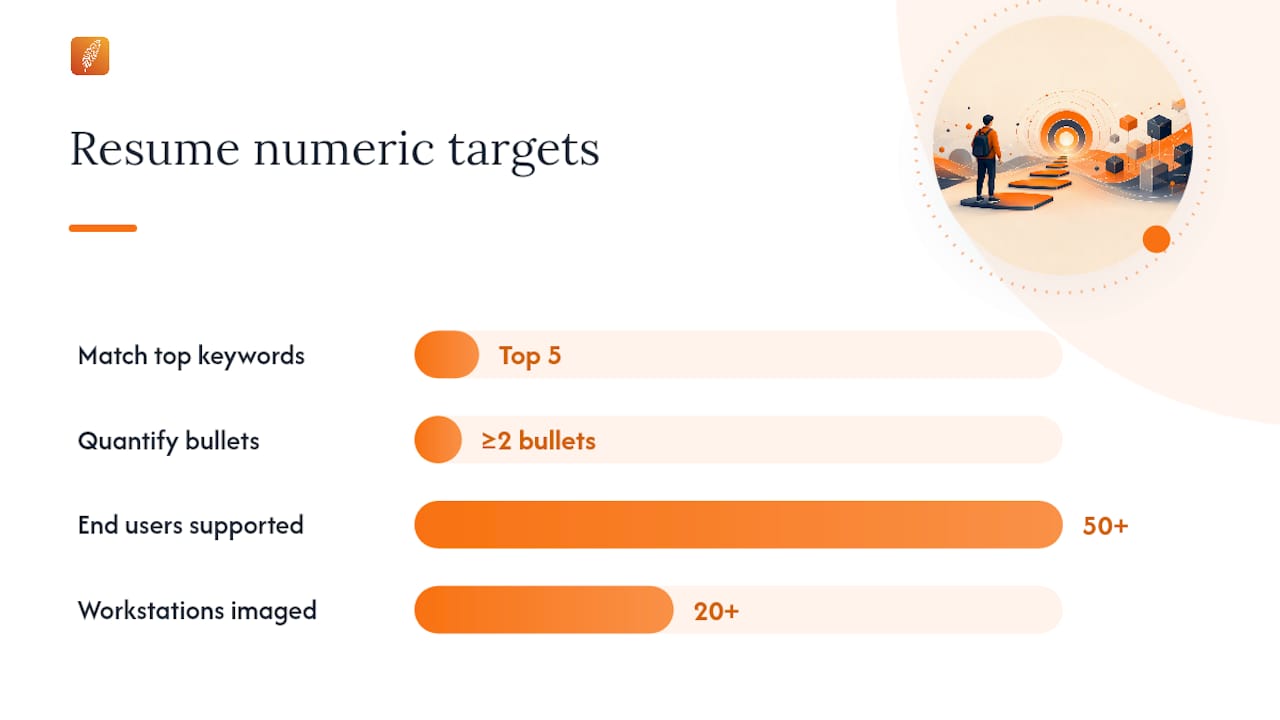
Applicant tracking systems scan for exact keyword matches, so pull terms straight from the job listing and place them in your summary, skills section, and work history.
Sample bullets that translate well across postings:
- "Provided Tier 1 support for 50+ end users, troubleshooting hardware and software issues via ticketing system."
- "Imaged and deployed 20+ workstations during a department refresh, reducing setup time by half."
- "Documented standard operating procedures for password resets and account provisioning, cutting repeat tickets."
Before submitting, run this checklist:
- Match your skills section to the top five keywords in the posting.
- Quantify at least two bullets with a number (tickets resolved, devices imaged, uptime maintained).
- Prepare answers for common early-career questions: "Walk me through how you'd troubleshoot a computer that won't connect to Wi-Fi" and "Tell me about a time you had to explain something technical to a non-technical person."
A structured application checklist can help you avoid missing a step when you're applying to a dozen roles a week.
Which Certifications Actually Help You Get Hired?
Not every credential carries equal weight with recruiters, so prioritize the ones employers actually screen for.
- CompTIA A+: The most widely recognized foundational credential for support-focused entry-level roles, typically two to four months of part-time study.
- Google IT Support Professional Certificate: A self-paced online program covering troubleshooting, networking, and customer service, usually completed in three to six months.
- Microsoft Fundamentals: Useful if you're targeting roles inside a Microsoft-heavy environment (Azure, 365 administration).
- Short bootcamps: Vendor-run or community college programs, often four to twelve weeks, useful if you want structured, cohort-based learning.
Prioritize a certification first if you have zero portfolio material. If you already have a home lab or documented project, split your time between the credential and refining that portfolio, since both get referenced in interviews.
Why Targeted Outreach Beats Blind Applying
Broad applying works, but it's slow. Candidates who pair aggregator searches with targeted outreach and niche platforms tend to reach interview stage faster than those relying on volume alone. University-linked platforms and hiring manager contact data both shrink the gap between application and response.
Pro Tip: If you email a hiring manager, do it two to three business days after applying, not the same day. It reads as a genuine follow-up rather than a scripted mass message.
Use aggregators for volume and speed. Use targeted outreach when you've identified a specific company or team you actually want to join.
A Realistic Take on Breaking Into IT
Most people who land their first IT job don't wait for the "perfect" opening. They get a certification, build one credible project, and apply consistently for two to four weeks before momentum kicks in. Run the plan above for seven days, then adjust based on what actually gets responses.
Let Pluckjobs Find the Roles and the People Behind Them
Applying blind to fifty postings a week burns time you don't have when you're job hunting and job searching at once. Pluckjobs matches you to entry-level IT roles using role discovery built on real-time job data, then surfaces the hiring manager's contact information so you can reach out directly instead of waiting in an applicant tracking queue with two hundred other resumes.
The platform also runs your resume through AI optimization to align it with the exact keywords a listing's ATS is scanning for, the same tactic covered in the resume section above, but automated. If you're ready to stop guessing which titles to search and start getting responses, start your job search with Pluckjobs and see your first batch of matched roles today.
Sources
- 10 Entry-Level IT Jobs: Skills, Pay, and Opportunities | Coursera
- Top tech job boards for IT job seekers | Forbes
- Computer support specialists | Occupational Outlook Handbook | BLS
- CompTIA A+ certification | CompTIA
For a deeper look at search strategy, Pluckjobs also covers IT career progression from entry-level roles on its blog.
FAQ
How do you get an IT job with no experience?
Earn a foundational certification like CompTIA A+, build one hands-on project (a home lab or ticket log), and apply to help desk or support titles using keywords pulled from the job posting.
What is the easiest entry-level IT job to get?
Help desk technician roles tend to have the lowest barrier to entry since many employers accept a high school diploma plus a basic certification instead of a degree.
What are some good entry-level IT jobs?
Help desk technician, desktop support specialist, junior network technician, and IT support specialist are among the most commonly posted entry-level titles, each suited to a different mix of customer service and technical skill.
Do entry-level IT jobs still exist?
Yes. Support-focused roles remain steadily posted across MSPs, school districts, hospitals, and staffing agencies, and BLS data on computer support specialists confirms consistent demand in this occupational category.
How can Pluckjobs help you find entry level IT jobs faster?
Pluckjobs matches your background to open entry-level IT roles and provides hiring manager contact details, letting you reach out directly instead of relying on applications alone.