
Use a single-column hybrid format: a top-loaded summary and skills section, followed by reverse-chronological work experience. Export it as a text-based PDF unless the job posting specifically requests a .docx file. That layout parses cleanly across major applicant tracking systems because it matches how ATS software actually reads resumes, and it avoids the silent failures that sink otherwise strong candidates.
Before you submit anything, run this check:
- Layout: single column, no sidebars, no tables
- File type: text-based PDF (or .docx if requested)
- Test it: copy the entire resume and paste it into a plain text editor. If the sections come out jumbled or content is missing, the ATS will see the same mess.
Key Takeaways
A single-column hybrid resume exported as a text-based PDF, using standard headings and inline dates, parses reliably across the major ATS platforms hiring teams actually use.
| Point | Details |
|---|---|
| Best layout | Single-column hybrid: summary and skills up top, reverse-chronological experience below. |
| Safest file type | Text-based PDF by default; switch to .docx only when the posting requests it. |
| Standard headings required | Use Work Experience, Education, Skills, and Certifications, not creative labels. |
| Quick validation | Copy-paste your resume into Notepad to catch scrambled sections before you apply. |
| Tailor for keywords | Pluckjobs automates job-specific keyword alignment for IT and cybersecurity resumes. |
Table of Contents
- What Is the ATS Resume Format, and Why Does Structure Matter?
- An ATS-Ready Formatting Checklist You Can Run in 10 Minutes
- File Types and Export Settings: Make the Parser See Your Text
- Layout Rules and the Silent Mistakes That Break Parsing
- Where to Find ATS-Safe Resume Templates
- Why Tailored, Job-Specific Resumes Score Higher
- Sources
- FAQ
What Is the ATS Resume Format, and Why Does Structure Matter?
An ATS resume format is a layout built to survive automated parsing rather than just look good to a human eye. Most applicant tracking systems don't "read" a resume the way you do. They extract text and slot it into a database using a fixed heading library, mapping chunks of content into fields like Work Experience, Education, and Skills.
That's why a heading like "My Journey" or "Where I've Made an Impact" often gets ignored entirely. The parser doesn't recognize it, so it either drops that content or dumps it into an unstructured "notes" field a recruiter rarely opens. Standard, recognizable section labels are what tell the system where your job titles, dates, and skills actually live.
Multi-column layouts compound the problem. Parsers typically read left to right, line by line, across the full page width. A two-column resume gets read out of order, stitching your job title from column one to a bullet point from column two into a sentence that makes no sense to the system.

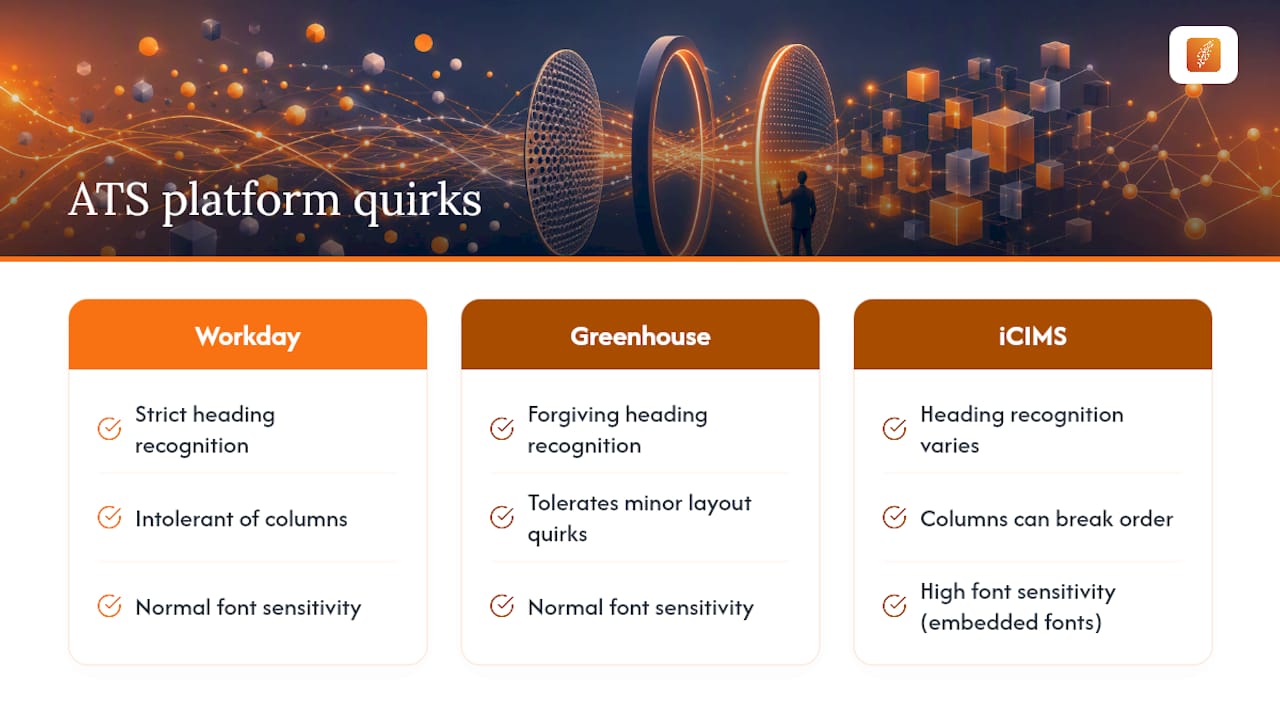
Not every platform behaves identically. Workday tends to be strict about heading recognition and column structure. Greenhouse is comparatively forgiving with minor formatting quirks. iCIMS has a reputation for font sensitivity, where an embedded or unusual typeface can break the text layer entirely. Targeting the same single-column hybrid layout works across Workday, Greenhouse, and iCIMS without needing a separate version for each one.
An ATS-Ready Formatting Checklist You Can Run in 10 Minutes
You don't need to rebuild your resume from scratch to make it ATS compliant. Most fixes are structural, not creative, and you can work through them in order.
- Set the layout. Single column, top to bottom. Margins between 0.5 and 1 inch. Body text at 10 to 11 point.
- Pick a safe font. Stick to Arial, Calibri, Helvetica, Roboto, or Open Sans to avoid font substitution issues that can corrupt the underlying text layer.
- Use exact heading labels. Summary or Professional Summary, Work Experience or Professional Experience, Education, Skills, Certifications.
- Format dates consistently. Use "Mon YYYY – Mon YYYY" and place dates inline on the same line as the job title and employer, with company name before title.
- Write plain bullets. Use a simple bullet character, not a custom icon, and keep 3 to 5 bullets per recent role: action verb, tool or method, measurable result.
- Export correctly. Save as a text-based PDF by default, switch to .docx only when the posting asks for it.
- Name the file clearly. Use firstname-lastname-resume.pdf or firstname-lastname-resume.docx.
- Run the copy-paste test. Select all, copy, paste into Notepad. If sections scramble or text vanishes, fix the layout before you apply.
If you're customizing a resume for a specific IT role, this job application checklist walks through the technical-role specifics in more depth.
Pro Tip: Keep a plain-text master copy of your resume saved separately. When a job posting's application portal has its own text-parsing quirks, you can paste directly from that clean version instead of fighting formatting inside a PDF viewer.

File Types and Export Settings: Make the Parser See Your Text
The format debate mostly comes down to one question: does the file preserve a real, selectable text layer? A text-based PDF is generally the safer default in 2026, though .docx remains the most universally compatible option across older or enterprise-grade ATS engines that haven't kept pace with newer parsing standards.
What breaks parsing entirely:
- Scanned or image-based PDFs, where the "text" is actually a picture the ATS can't read at all
- PDF/A files, which sometimes lock or restructure the text layer during archiving
- Password-protected PDFs, which many systems can't open at all
To export safely from Word or Google Docs, use "Save As" or "Download" and choose PDF directly from the native export menu rather than printing to PDF through a third-party driver, which can flatten text into an image. Once exported, open the file, select all the text, and copy it into a blank document. If every word transfers cleanly, you're set.
Layout Rules and the Silent Mistakes That Break Parsing
Most ATS failures are invisible to the applicant. Your resume looks fine on screen, gets submitted, and simply never surfaces in a recruiter's search. The layout is almost always the culprit.
- Two-column and sidebar templates scramble parser output because the system reads left to right across the page, mixing your skills column with your experience column into nonsense. Convert to one column and move contact details into the main body instead of a sidebar.
- Tables and text boxes get read across cells in unpredictable order. Flatten any tabular content into straight lines and bullets.
- Headers and footers are frequently skipped entirely, so contact information placed there can vanish from the parsed record even though it's clearly visible on the page.
- Logos, charts, icon bullets, and skill bars add nothing a parser can read. Replace them with plain text lines and comma-separated skill lists.
- Inconsistent date and title ordering confuses field extraction. Keep company name, job title, and dates in the same order across every role.
Pro Tip: If you're not sure whether a mistake is silent, assume it is. A resume that looks polished but fails to parse never even reaches a human, which is worse than a plain resume that gets read correctly.
Where to Find ATS-Safe Resume Templates
The built-in plain templates inside Word and Google Docs are usually your safest starting point, since they default to single-column layouts and standard headings without the sidebars and graphics that decorative templates favor. Downloadable .docx templates marketed specifically as "ATS-friendly" can work too, but verify each one rather than trusting the label.
Run this quick vetting routine on any template before you commit to it:
- Select all the text, copy it, and paste into Notepad to check the output order
- Export a test version to PDF and confirm the text is selectable, not an image
- Scan for nonstandard headings and rename anything creative back to a standard label
- Strip out sidebars, icon graphics, and skill-rating bars before adding your own content
Customize the font and heading style freely. Avoid template features that require columns, text boxes, or embedded graphics to display correctly, since those are the elements most likely to fail across different ATS platforms.
Why Tailored, Job-Specific Resumes Score Higher
A clean format gets your resume parsed. Matching the job posting's language is what gets it ranked once it's in the system. When your summary and skills section mirror the exact keywords in a listing, ATS platforms weight that resume higher in early scoring, and recruiters searching the database by keyword are more likely to surface it.
Pluckjobs automates that keyword alignment for IT and cybersecurity applicants, generating a tailored resume per job rather than asking you to manually rewrite your summary for every application. For the manual approach, this guide on customizing a resume per job posting breaks down exactly what to adjust.
- Match summary language to the posting's top 3 to 5 required skills
- List full certification names, not just acronyms, so both keyword search and ATS parsing catch them like the certifications in this resume booster package
A Note From Diego on Resume Formatting
Most formatting mistakes I see in IT and cybersecurity resumes aren't about creativity. They're about applicants copying a visually appealing template without checking whether it survives a parser. . For more on how tailored resumes perform against generic ones, see how AI writes job-specific resumes.
— Diego
Plucky AI Tailors Your Resume to Every Job, Automatically
Manually rewriting your summary and skills section for every IT or cybersecurity role you apply to is the part most job seekers skip, even though it's what moves a resume from "parsed" to "ranked." Plucky AI closes that gap by generating a job-specific, ATS-optimized resume for each listing, aligning keywords automatically and pairing it with hiring manager contact data so your application isn't just correctly formatted, it's actually seen.
The platform handles resume tailoring, keyword alignment, and outreach research in one workflow built specifically for technology and security roles, not a generic job board template. If you want your next application built around the exact posting you're targeting instead of a one-size-fits-all resume, start your free trial and upload your current resume to see the tailored version it generates.
Sources
- The resume format to beat ATS and get hired in 2026
- Do applicant tracking systems prefer resumes in PDF format?
- ATS Resume Format Guide 2026: What Actually Parses
FAQ
What Is the ATS Format for a Resume?
The ATS format is a single-column, reverse-chronological layout using standard section headings and a text-based PDF or .docx file, built so parsing software can correctly extract your work history and skills.
Is 80% a Good ATS Score?
ATS match scores vary by platform and job, so there's no universal passing number. Focus less on chasing a specific score and more on matching your summary and skills to the posting's core keywords.
Can ATS Detect a ChatGPT Resume?
Most applicant tracking systems parse text and structure, not writing style, so they don't flag AI-generated content directly. Recruiters reviewing the resume afterward, however, can often spot generic or repetitive AI phrasing.
How Do I Convert My Resume to ATS Format?
Strip out columns, tables, and graphics, switch to standard headings like Work Experience and Skills, and re-export as a text-based PDF. Then run the copy-paste test into Notepad to confirm nothing scrambled during conversion.